Cisco Switches in Iran, Russia Hacked in Apparent Pro-US Attack

Hacked Cisco Switch

A significant number of Cisco switches located in Iran and Russia have been hijacked in what appears to be a hacktivist campaign conducted in protest of election-related hacking. However, it’s uncertain if the attacks involve a recently disclosed vulnerability or simply abuse a method that has been known for more than a year.

Cisco devices belonging to organizations in Russia and Iran have been hijacked via their Smart Install feature. The compromised switches had their IOS image rewritten and their configuration changed to display a U.S. flag using ASCII art and the message “Don’t mess with our elections…”

The hackers, calling themselves “JHT,” told Motherboard that they wanted to send a message to government-backed hackers targeting “the United States and other countries.” They claim to have only caused damage to devices in Iran and Russia, while allegedly patching most devices found in countries such as the U.S. and U.K.

Iran’s Communication and Information Technology Ministry stated that the attack had impacted roughly 3,500 switches in the country, but said a vast majority were quickly restored.

Kaspersky Lab reported that the attack appeared to mostly target the “Russian-speaking segment of the Internet.”

While there are some reports that the attack involves a recently patched remote code execution vulnerability in Cisco’s IOS operating system (CVE-2018-0171), that might not necessarily be the case.

The Cisco Smart Install Client is a legacy utility that allows no-touch installation of new Cisco switches. Roughly one year ago, the company warned customers about misuse of the Smart Install protocol following a spike in Internet scans attempting to detect unprotected devices that had this feature enabled.

Attacks, including ones launched by nation-state threat actors such as the Russia-linked Dragonfly, abused the fact that many organizations had failed to securely configure their switches, rather than an actual vulnerability.

Cisco issued a new warning last week as the disclosure of CVE-2018-0171 increases the risk of attacks, but the networking giant said it had not actually seen any attempts to exploit this vulnerability in the wild. Cisco’s advisory for this flaw still says there is no evidence of malicious exploitation.

There are hundreds of thousands of Cisco switches that can be hijacked by abusing the Smart Install protocol, and Cisco Talos experts believe attackers are unlikely to bother using CVE-2018-0171.

The Network Security Research Lab at Chinese security firm Qihoo 360 says the data from its honeypot shows that the attacks have “nothing to do with CVE-2018-0171” and instead rely on a publicly available Smart Install exploitation tool released several months ago.

While none of the major players in the infosec industry have confirmed that the attacks on Iran and Russia rely on CVE-2018-0171, technical details and proof-of-concept (PoC) code have been made available by researchers, making it easier for hackers to exploit.

Hamed Khoramyar, founder of Sweden-based ICT firm Aivivid, said the attacks exploited CVE-2018-0171. Kudelski Security also reported seeing attacks involving both CVE-2018-0171 and another recently disclosed IOS vulnerability tracked as CVE-2018-0156. However, Kudelski’s blog post also lists Khoramyar as one of its sources.

Security Week

Facebook’s Cambridge Analytica data scandal, explained

Cambridge Analytica improperly obtained data from as many as 50 million people. That’s put Mark Zuckerberg on the defensive.
The Verge

Chrome Is Scanning Files on Your Computer

The browser you likely use to read this article scans practically all files on your Windows computer. And you probably had no idea until you read this. Don’t worry, you’re not the only one.

Last year, Google announced some upgrades to Chrome, by far the world’s most used browser—and the one security pros often recommend. The company promised to make internet surfing on Windows computers even “cleaner” and “safer ” adding what The Verge called “basic antivirus features.” What Google did was improve something called Chrome Cleanup Tool for Windows users, using software from cybersecurity and antivirus company ESET.

Tensions around the issue of digital privacy are understandably high following Facebook’s Cambridge Analytica scandal, but as far as we can tell there is no reason to worry here, and what Google is doing is above board.

In practice, Chome on Windows looks through your computer in search of malware that targets the Chrome browser itself using ESET’s antivirus engine. If it finds some suspected malware, it sends metadata of the file where the malware is stored, and some system information, to Google. Then, it asks you to for permission to remove the suspected malicious file. (You can opt-out of sending information to Google by deselecting the “Report details to Google” checkbox.)

A screenshot of the Chrome pop-up that appears if Chrome Cleanup Tool detects malware on your Windows computer.

A screenshot of the Chrome pop-up that appears if Chrome Cleanup Tool detects malware on your Windows computer.

Last week, Kelly Shortridge, who works at cybersecurity startup SecurityScorecard, noticed that Chrome was scanning files in the Documents folder of her Windows computer.

“In the current climate, it really shocked me that Google would so quietly roll out this feature without publicizing more detailed supporting documentation—even just to preemptively ease speculation,” Shortridge told me in an online chat. “Their intentions are clearly security-minded, but the lack of explicit consent and transparency seems to violate their own criteria of ‘user-friendly software’ that informs the policy for Chrome Cleanup [Tool].”

Her tweet got a lot of attention and caused other people in the infosec community—as well as average users such as me—to scratch their heads.

“Nobody likes surprises,” Haroon Meer, the founder at security consulting firm Thinkst, told me in an online chat. “When people fear a big brother, and tech behemoths going too far…a browser touching files it has no business to touch is going to set off alarm bells.”

Now, to be clear, this doesn’t mean Google can, for example, see photos you store on your windows machine. According to Google, the goal of Chrome Cleanup Tool is to make sure malware doesn’t mess up with Chrome on your computer by installing dangerous extensions, or putting ads where they’re not supposed to be.

As the head of Google Chrome security Justin Schuh explained on Twitter, the tool’s “sole purpose is to detect and remove unwanted software manipulating Chrome.” Moreover, he added, the tool only runs weekly, it only has normal user privileges (meaning it can’t go too deep into the system), is “sandboxed” (meaning its code is isolated from other programs), and users have to explicitly click on that box screenshotted above to remove the files and “cleanup.”

In other words, Chrome Cleanup Tool is less invasive than a regular “cloud” antivirus that scans your whole computer (including its more sensitive parts such as the kernel) and uploads some data to the antivirus company’s servers.

But as Johns Hopkins professor Matthew Green put it, most people “are just a little creeped out that Chrome started poking through their underwear drawer without asking.”

That’s the problem here: most users of an internet browser probably don’t expect it to scan and remove files on their computers.

When reached out for comment, a Google spokesperson redirected me to the blog post from last year and Schuh’s tweets.

A section in Chrome’s Privacy Whitepaper explains that “Chrome periodically scans your device to detect potentially unwanted software.” That exact language has been there since at least January of 2017, according to archived versions of the whitepaper. And similar language (“Chrome scans your computer periodically for the sole purpose of detecting potentially unwanted software”) has been there for even longer.

Martijn Grooten, the editor of Virus Bulletin and organizer of one of the premiere antivirus conferences in the world, told me in a Twitter chat that the behavior of the Chrome Cleanup Tool was “sensible.”

“For almost all users, this seems really harmless, and for those who are extremely concerned about Google seeing some metadata, maybe they shouldn’t be running Google’s browser in the first place,” he said.

Motherboard

Facebook Password Stealing Apps Found on Android Play Store

android malware

Even after many efforts made by Google last year, malicious apps always somehow manage to make their ways into Google app store.

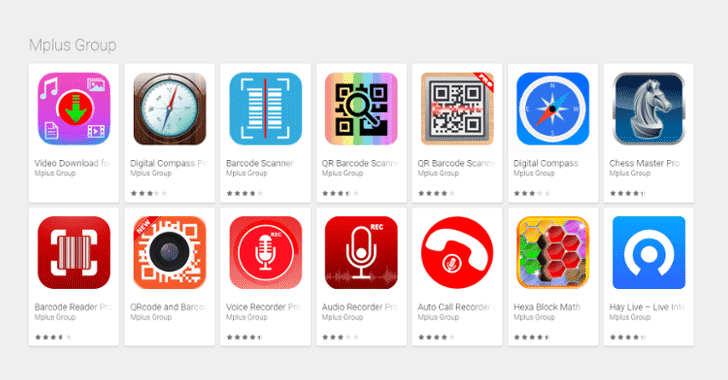
Security researchers have now discovered a new piece of malware, dubbed GhostTeam, in at least 56 applications on Google Play Store that is designed to steal Facebook login credentials and aggressively display pop-up advertisements to users.

Discovered independently by two cybersecurity firms, Trend Micro and Avast, the malicious apps disguise as various utility (such as the flashlight, QR code scanner, and compass), performance-boosting (like file-transfer and cleaner), entertainment, lifestyle and video downloader apps.

Like most malware apps, these Android apps themselves don’t contain any malicious code, which is why they managed to end up on Google’s official Play Store.

Once installed, it first confirms if the device is not an emulator or a virtual environment and then accordingly downloads the malware payload, which prompts the victim to approve device administrator permissions to gain persistence on the device.

“The downloader app collects information about the device, such as unique device ID, location, language and display parameters,” Avast said. “The device’s location is obtained from the IP address that is used when contacting online services that offer geolocation information for IPs.”

How Android Malware Steals Your Facebook Account Password

As soon as users open their Facebook app, the malware immediately prompts them to re-verify their account by logging into Facebook. Instead of exploiting any system or application vulnerabilities, the malware uses a classic phishing scheme in order to get the job done.

These fake apps simply launch a WebView component with Facebook look-alike login page and ask users to log-in. Apparently, WebView code steals the victim’s Facebook username and password and sends them to a remote hacker-controlled server.

“This is most likely due to developers using embedded web browsers (WebView, WebChromeClient) in their apps, instead of opening the webpage in a browser,” Avast said.

Trend Micro researchers warn that these stolen Facebook credentials can later be repurposed to deliver “far more damaging malware” or “amass a zombie social media army” to spread fake news or generate cryptocurrency-mining malware.

Stolen Facebook accounts can also expose “a wealth of other financial and personally identifiable information,” which can then be sold in the underground markets.

Security firms believe that GhostTeam has been developed and uploaded to the Play Store by a Vietnamese developer due to considerable use of Vietnamese language in the code.

According to the researchers, the most users affected by the GhostTeam malware reportedly resides in India, Indonesia, Brazil, Vietnam, and the Philippines.

Besides stealing Facebook credentials, the GhostTeam malware also displays pop up adverts aggressively by always keeping the infected device awake by showing unwanted ads in the background.

All the apps have since been removed by Google from the Play Store after researchers reported them to the company. However, users who have already installed one such app on their devices should make sure they have Google Play Protect enabled.

Play Protect security feature uses machine learning and app usage analysis to remove (i.e. uninstall) malicious apps from users Android smartphones in an effort to prevent any further harm.

Although malicious apps floating on the official app store is a never-ending concern, the best way to protect yourself is always to be vigilant when downloading apps, and always verify app permissions and reviews before you download one.

Moreover, you are strongly advised to keep a good antivirus app on your mobile device that can detect and block such threat before they infect your device, and most importantly, always keep your device and apps up-to-date.

The Hacker News

New Mac Malware Hijacks Web Connections: What to Do

“2018 is barely two weeks old, and already it looks like we’ve got new piece of macOS malware! Hooray :)”

That’s how Apple-focused security researcher Patrick Wardle opened a blog post on Jan. 11, detailing what Wardle calls “MaMi,” a stealthy DNS hijacker that reroutes your internet traffic to possibly malicious websites.

MaMi also has abilities that haven’t yet been activated: It can steal passwords, take screenshots, download files and programs, run other pieces of software and inject bogus security certificates.

Check If You’re Infected

To see whether your Mac was infected by MaMi, go to System Preferences, click on the Network section and check the IP address of your DNS server. If it’s “82.163.143.135” or “82.163.142.137,” then you’ll need to change it to something benign, such as Google’s 8.8.8.8 or 8.8.4.4 or OpenDNS’s 208.67.2222.222 or 208.67.220.220.

Notice we said “was” infected. The MaMi sample that Wardle found deleted itself after changing the DNS settings on his test machine, so even if you found a smoking-gun DNS setting, the malware that did it may be long gone.

How to Prevent Infection

To prevent infection by MaMi, use common sense. Every piece of Mac malware found in recent years has required user approval, presumably unwitting, to be installed.

So don’t authorize that Adobe Flash Player update, that video player you apparently need to see a clip of a naked celebrity, or that antivirus software that showed up in a pop-up window telling you your Mac was infected. Instead, hold off and get Mac antivirus software straight from the source.

It’s not yet known how MaMi (named after a text string Wardle found in the code) infects a Mac, though Wardle suspects “rather lame methods such as malicious email, web-based fake security alerts/popups or social-engineering type attacks.” But as of this writing, only one antivirus scanning engine in the online VirusTotal repository detects MaMi through the usual file-matching methods.

How MaMi Malware Works

DNS servers are the phone books of the internet. They match human requests with network addresses  so that, among other things, you can see this website in your web browser.

DNS hijacking sends a computer to a malicious DNS server that could, for example, send you to an evil version of Tom’s Guide that could infect you with even more malware.

It’s not clear how widespread MaMi is so far. Wardle was tipped off to it by a posting on a Malwarebytes forum, but didn’t explain how he located his own copy. Wardle did point to a website that automatically downloaded the binary to our computer when we connected. (We’re using a Windows PC, so the malware didn’t do anything to us.)

tomsguide.com

Microsoft Issues Emergency Windows Security Update For A Critical Vulnerability

If your computer is running Microsoft’s Windows operating system, then you need to apply this emergency patch immediately. By immediately, I mean now!

Microsoft has just released an emergency security patch to address a critical remote code execution (RCE) vulnerability in its Malware Protection Engine (MPE) that could allow an attacker to take full control of a victim’s PC.

Enabled by default, Microsoft Malware Protection Engine offers the core cybersecurity capabilities, like scanning, detection, and cleaning, for the company’s antivirus and antimalware programs in all of its products.

According to Microsoft, the vulnerability affects a large number of Microsoft security products, including Windows Defender and Microsoft Security Essentials along with Endpoint Protection, Forefront Endpoint Protection, and Exchange Server 2013 and 2016, impacting Windows 7, Windows 8.1, Windows 10, Windows RT 8.1, and Windows Server.

Tracked as CVE-2017-11937, the vulnerability is a memory corruption issue which is triggered when the Malware Protection Engine scans a specially crafted file to check for any potential threat.

Flaw Lets Hackers Take Full Control of Your Computer

Successful exploitation of the flaw could allow a remote attacker to execute malicious code in the security context of the LocalSystem account and take control of the target’s computer.

Microsoft said an attacker could place a specially crafted malicious file in a location that is scanned by the Malware Protection Engine to exploit the memory corruption flaw which eventually leads to remote code execution.

“There are many ways that an attacker could place a specially crafted file in a location that is scanned by the Microsoft Malware Protection Engine. For example, an attacker could use a website to deliver a specially crafted file to the victim’s system that is scanned when the website is viewed by the user,” the report from Microsoft explained.

Other ways to deliver a specially crafted file could be via emails or Instant Messenger services. The attacker could also “take advantage of websites that accept or host user-provided content, to upload a specially crafted file to a shared location that is scanned by the Malware Protection Engine running on the hosting server,” the report said.

Patch! Patch! Patch!

Microsoft assured its customers that the vulnerability was fixed before any misuses in the wild.

The company has released an out-of-band critical update for the flaw and advised users to install it as soon as possible. Most home users and many enterprise customers will get the emergency patch automatically over the air.

The security vulnerability was discovered and reported to Microsoft by the UK’s National Cyber Security Centre (NCSC), a cyber defense organization of Britain’s signals intelligence and cybersecurity agency, known as GCHQ.

The emergency fix comes just days before Microsoft is scheduled to roll out its December Patch Tuesday updates.

The Hacker News

macOS High Sierra Bug Lets Anyone Gain Root Access Without a Password

If you own a Mac computer and run the latest version of Apple’s operating system, macOS High Sierra, then you need to be extra careful with your computer.

A serious, yet stupid vulnerability has been discovered in macOS High Sierra that allows untrusted users to quickly gain unfettered administrative (or root) control on your Mac without any password or security check, potentially leaving your data at risk.

Discovered by developer Lemi Orhan Ergin on Tuesday, the vulnerability only requires anyone with physical access to the target macOS machine to enter “root” into the username field, leave the password blank, and hit the Enter a few times—and Voila!

In simple words, the flaw allows an unauthorized user that gets physical access on a target computer to immediately gain the highest level of access to the computer, known as “root,” without actually typing any password.

Needless to say, this blindingly easy Mac exploit really scary stuff.

This vulnerability is similar to one Apple patched last month, which affected encrypted volumes using APFS wherein the password hint section was showing the actual password of the user in the plain text.

Here’s How to Login as Root User Without a Password

If you own a Mac and want to try this exploit, follow these steps from admin or guest account:

  • Open System Preferences on the machine.
  • Select Users & Groups.
  • Click the lock icon to make changes.
  • Enter “root” in the username field of a login window.
  • Move the cursor into the Password field and hit enter button there few times, leaving it blank.

With that (after a few tries in some cases) macOS High Sierra logs the unauthorized user in with root privileges, allowing the user to access your Mac as a “superuser” with permission to read and write to system files, including those in other macOS accounts as well.

This flaw can be exploited in several ways, depending on the setup of the targeted Mac. With full-disk encryption disabled, a rogue user can turn on a Mac that’s entirely powered down and log in as root by doing the same trick.

At Mac’s login screen, an untrusted user can also use the root trick to gain access to a Mac that has FileVault turned on to make unauthorized changes to the Mac System Preferences, like disabling FileVault.

All the untrusted user needs to do is click “Other” at the login screen, and then enter “root” again with no password.

However, it is impossible to exploit this vulnerability when a Mac machine is turned on, and the screen is protected with a password.

Ergin publicly contacted Apple Support to ask about the issue he discovered. Apple is reportedly working on a fix.

“We are working on a software update to address this issue. In the meantime, setting a root password prevents unauthorized access to your Mac. To enable the Root User and set a password, please follow the instructions here: https://support.apple.com/en-us/HT204012. If a Root User is already enabled, to ensure a blank password is not set, please follow the instructions from the ‘Change the root password’ section.”

Here’s How to Temporarily Fix the macOS High Sierra Bug

Fortunately, the developer suggested a temporary fix for this issue which is as easy as its exploit.

To fix the vulnerability, you need to enable the root user with a password. Heres how to do that:

  • Open System Preferences and Select Users & Groups
  • Click on the lock icon and Enter your administrator name and password there
  • Click on “Login Options” and select “Join” at the bottom of the screen
  • Select “Open Directory Utility”
  • Click on the lock icon to make changes and type your username and password there
  • Click “Edit” at the top of the menu bar
  • Select “Enable Root User” and set a password for the root user account

This password will prevent the account from being accessed with a blank password.

Just to be on the safer side, you can also disable Guest accounts on your Mac. for this, head on to System Preferences → Users & Groups, select Guest User after entering your admin password, and disable “Allow guests to log in to this computer.”


Microsoft Releases Update to Fix 53 Vulnerabilities

Microsoft has released a large batch of security updates as part of its November Patch Tuesday in order to fix a total of 53 new security vulnerabilities in various Windows products, 19 of which rated as critical, 31 important and 3 moderate.

The vulnerabilities impact the Windows OS, Microsoft Office, Microsoft Edge, Internet Explorer, Microsoft Scripting Engine, .NET Core, and more.

At least four of these vulnerabilities that the tech giant has now fixed have public exploits, allowing attackers to exploit them easily. But fortunately, none of the four are being used in the wild, according to Gill Langston at security firm Qualys.

The four vulnerabilities with public exploits identified by Microsoft as CVE-2017-8700 (an information disclosure flaw in ASP.NET Core), CVE-2017-11827 (Microsoft browsers remote code execution), CVE-2017-11848 (Internet Explorer information disclosure) and CVE-2017-11883 (denial of service affecting ASP.NET Core).

Potentially Exploitable Security Vulnerabilities

What’s interesting about this month’s patch Tuesday is that none of the Windows OS patches are rated as Critical. However, Device Guard Security Feature Bypass Vulnerability (CVE-2017-11830) and Privilege Elevation flaw (CVE-2017-11847) are something you should focus on.

Also, according to an analysis of Patch Tuesday fixes by Zero-Day Initiative, CVE-2017-11830 and another flaw identified as CVE-2017-11877 can be exploited to spread malware.

“CVE-2017-11830 patches a Device Guard security feature bypass vulnerability that would allow malware authors to falsely authenticated files,” Zero-Day Initiative said.

“CVE-2017-11877 fixes an Excel security feature bypass vulnerability that fails to enforce macro settings, which are often used by malware developers.”

The tech giant also fixed six remote code execution vulnerabilities exist “in the way the scripting engine handles objects in memory in Microsoft browsers.”

Microsoft identified these vulnerabilities as CVE-2017-11836, CVE-2017-11837, CVE-2017-11838, CVE-2017-11839, CVE-2017-11871, and CVE-2017-11873, which could corrupt memory in such a way that attackers could execute malicious code in the context of the current user.

“In a web-based attack scenario, an attacker could host a specially crafted website that is designed to exploit the vulnerability through Microsoft Edge and then convince a user to view the website,” Microsoft said. “These websites could contain specially crafted content that could exploit the vulnerability.”

17-Year-Old MS Office Flaw Lets Hackers Install Malware

Also, you should be extra careful when opening files in MS Office.

All versions of Microsoft Office released in the past 17 years found vulnerable to remote code execution flaw(CVE-2017-11882) that works against all versions of Windows operating system, including the latest Microsoft Windows 10 Creators Update.

However, due to improper memory operations, the component fails to properly handle objects in the memory, corrupting it in such a way that the attacker could execute malicious code in the context of the logged-in user.

Exploitation of this vulnerability requires opening a specially crafted malicious file with an affected version of Microsoft Office or Microsoft WordPad software, which could allow attackers to remotely install malware on targeted computers.

Adobe Patch Tuesday: Patches 62 Vulnerabilities

Besides fixing vulnerabilities in its various products, Microsoft has also released updates for Adobe Flash Player.

These updates correspond with Adobe Update APSB17-33, which patches 62 CVEs for Acrobat and Reader alone. So, Flash Player users are advised to ensure that they update Adobe across their environment to stay protected.

It should also be noted that last Patch Tuesday, Microsoft quietly released the patch for the dangerous KRACK vulnerability (CVE-2017-13080) in the WPA2 wireless protocol.

Therefore, users are also recommended to make sure that they have patched their systems with the last month’s security patches.

Alternatively, users are strongly advised to apply November security patches as soon as possible in order to keep hackers and cybercriminals away from taking control of their computers.

For installing security updates, just head on to Settings → Update & security → Windows Update → Check for updates, or you can install the updates manually.

The Hacker News

Built-in Keylogger Found in MantisTek GK2 Keyboards—Sends Data to China

“The right keyboard can make all the difference between a victory and a defeat in a video game battlefield.”

If you are a gamer, you can relate to the above quote.

But what if your winning weapon betrays you?

The popular 104-key Mantistek GK2 Mechanical Gaming Keyboard that costs around €49.66 has allegedly been caught silently recording everything you type on your keyboard and sending them to a server maintained by the Alibaba Group.

This built-in keylogger in Mantistek GK2 Mechanical Gaming Keyboard was noticed by a few owners who headed on to an online forum to share this issue.

According to Tom’s Hardware, MantisTek keyboards utilise ‘Cloud Driver’ software, maybe for collecting analytic information, but has been caught sending sensitive information to servers tied to Alibaba.

After analysing more closely, Tom’s Hardware team found that Mantistek keyboard does not include a full-fledged keylogger. Instead, it captures how many times a key has been pressed and sending this data back to online servers.

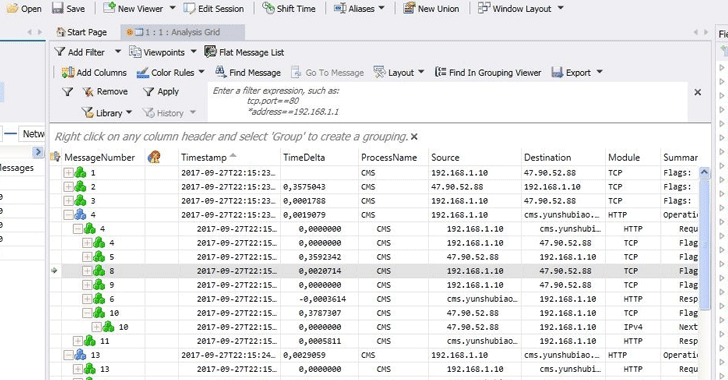
The affected users also provided a screenshot showing how all your plain-text keystrokes collected by the keyboard are being uploaded to a Chinese server located at IP address: 47.90.52.88.

However, even if there’s no malicious intent, capturing and uploading keystroke counts without users’ consent violates trust and puts systems’ security at risk by leaking sensitive information.

Mantistek-GK2-Mechanical-Gaming-Keyboard-Keylogger

Since Alibaba Group also sells cloud services like Google and Amazon, this collected information is not necessarily being sent to the Alibaba itself, but someone who is using its cloud service.

Opening the IP address in question directly into a web browser and on a Chinese login page, which translates to “Cloud mouse platform background management system” and is maintained by Shenzhen Cytec Technology Co., Ltd.

Reportedly, the MantisTek keyboard’s software sends the collected data to two destinations at that IP address:

  • /cms/json/putkeyusedata.php
  • /cms/json/putuserevent.php

The best way to prevent your keyboard from sending your keystrokes to the Alibaba server is to stop using your Mantistek GK2 Mechanical Gaming Keyboard until you hear back from the company about this issue.

If you cannot prevent yourself from using the keyboard, but want to stop it from sending your key presses to the Alibaba server, just make sure the MantisTek Cloud Driver software is not running in the background, and block the CMS.exe executable in your firewall.

To block the CMS.exe executable, add a new firewall rule for the MantisTek Cloud Driver in the “Windows Defender Firewall With Advanced Security.”

The Hacker News

Watch out: These phishing emails claiming to be a ‘secure message’ from your bank

Cyber criminals are faking secure messages from banks as a means of delivering malware to victims.

Often provided through an online portal, banks often provide secure messaging services for the purposes of communicating with the bank without having to pick up the phone or visit the a branch.

Hackers have realised that this provides a new method of attack and are now crafting spoof emails claiming to contain documentation relating to secure messages.

The sorts of clients who opt to use these secure messaging services are often high-value targets who already have a trusting online relationship with their bank – so could be more willing to follow instructions they get in an email from scammers that they believe to be real.

Criminals are registering domains that appear to look like legitimate bank domains and the fact they’re fake goes unnoticed because users don’t know how to spot an imposter or their email client doesn’t show the full domain in the subject line.

Uncovered by security researchers at Barracuda Networks, the campaign uses phishing emails to impersonate customers of big banks including Bank of America and TD Commercial banking.

The spoof messages are designed in such a way so as to look legitimate, even featuring sender addresses which look as if they come from the institution.

In some instances, the messages simply ask the victim to click on and download and attached document. However, others keep up the façade of being ‘secure’ – some emails provide instructions about using an authorization code to ‘unlock’ the attachment.

The malicious payload within is able to rewrite the files in the users’ directory on Windows machines once the victim opens the document – and this script can potentially missed by anti-virus software, thrown off the scent because they think the document is benign.

However, once downloaded onto the system, criminals have access to it and can update the script at a later date to become something more malicious, such as credential stealing malware – enabling them to stealthily gain access to the bank account of the victim – or something more brazen like ransomware.

Faking email messages might seem like a basic attack, but criminals are deploying this tactic because it works – especially when trusted institutions such as banks are used.

However, the good news is that users can be trained to spot phishing attacks – taking a step back and assessing the legitimacy of an email can go a long way towards protecting an individual or their organisation from falling victim to hackers.

zdnet