Zimbabwe blocks Facebook, WhatsApp and Twitter amid crackdown

Zimbabwe has blocked Facebook, Twitter and WhatsApp messaging app amid a crackdown on days of violent protests, BBC reported on Friday.

A coalition of local human rights groups says at least 12 people have been killed and many more beaten and tortured by security forces this week.

The Zimbabwe Human Rights NGO Forum accused the authorities of cutting off the internet “to mask the massive human rights violations”.

The protests were sparked on Monday by a sharp rise in the price of fuel.

The government has blamed the opposition and political rights groups for the protests, which has seen riot police clashing with protesters in the capital, Harare, and the southern city of Bulawayo after they lit fires and blocked roads using rocks.

There has been looting and some businesses and schools in the two cities have been forced to close. Soldiers are guarding petrol stations, where there are still long queues of motorists looking for petrol.

The UN has called on the government to halt the “excessive use of force” by security forces including firing live ammunition, and allegations of night-time door-to-door searches and beatings.

“Doctors’ associations say more than 60 people were treated in hospital for gunshot wounds, this is not way to react to the expression of economic grievances by the population,” Reuters news agency quotes UN human rights spokesperson Ravina Shamdasani as saying.

The Zimbabwe Human Rights NGO Forum said it had recorded at least 844 human rights violations in all.

On Thursday, prominent activist Evan Mawarire, who called for a stay-at-home protest on social media, was charged with subverting the government, a crime which carries up to 20 years in jail. He gained fame as a figurehead of the #ThisFlag protests against the former president, Robert Mugabe, in 2016.

President Emmerson Mnangagwa said the rise was aimed at tackling shortages caused by an increase in fuel use and “rampant” illegal trading.

But many Zimbabweans – worn down by years of economic hardship – suddenly found they could not even afford the bus fare to work.

Roads were barricaded by protesters earlier this week

They feel that the president, who is on a tour of Russia and Asian countries this week, is failing to live up to his promises following his election last year in disputed polls.

He is struggling to revive the economy, which is experiencing high inflation while wages have stagnated.

The southern African nation faces a severe shortage of US dollar cash and confidence in its bond notes, currency that can only be traded in Zimbabwe, is low.

The bond notes, or “bollars”, are supposed to be worth the same as the dollar but have lost value because of a lack of foreign currency backing the note, and are now worth much less than a dollar.

The fuel hike means petrol prices rose from $1.24 (₦445.16) a litre to $3.31(₦1,188.29) , with diesel up from $1.36(₦488.24) a litre to $3.11(₦1,116.49).

The new prices mean Zimbabwe now has the most expensive fuel in the world, according to GlobalPetrolPrices.com.

Hackers weaponise secure USB drives

A cyber-espionage group is targeting a specific type of secure USB drive created by a South Korean defence company in a bid to gain access to its air-gapped networks.

According to a blog post by researchers at Palo Alto Networks, the attack was carried out by a group called Tick which conducts cyber-espionage activities targeting organisations in Japan and Korea.

Researchers said the weaponisation of a secure USB drive is an uncommon attack technique and likely done in an effort to spread to air-gapped systems – networks that are not connected to the internet.

They added that the malware used in these attacks will only try to infect systems running Microsoft Windows XP or Windows Server 2003.

Researchers said that indicated the malware was intentionally targeting older, out-of-support versions of Microsoft Windows installed on systems with no internet connectivity.

The USB stick installs a program called “SymonLoader” as a trojanised version of a Japanese language GO game.

It then extracts a hidden executable file from a specific type of secure USB drive and executes it on the compromised system.

According to researchers, if SymonLoader finds it is on a Windows XP or Windows Server 2003 system and finds that a newly attached device is a USB drive made by this particular company, then it will extract an unknown executable file from the USB.

Researchers said that while the identity of the file SymonLoader writes to the USB is unknown, they added that they know enough about it to know it is malicious.

“In contrast to HomamLoader, which requires an internet connection to reach its C2 server to download additional payloads, SymonLoader attempts to extract and install an unknown hidden payload from a specific type of secure USB drive when it’s plugged into a compromised system.

“This technique is uncommon and hardly reported among other attacks in the wild,” the researchers said.

Javvad Malik, security advocate at AlienVault, told SC Media UK that this particular attack bears all the signs of a very specific targeted attack designed to infect particular institutes or machines – not too dissimilar to Stuxnet.

“Employees that work in sensitive organisations that have air-gapped networks should be particularly vigilant against plugging in devices. In some cases, even approved USB drives should be tested in a separate environment prior to being loaded in secure areas,” he said.

“Prevention aside, critical systems should have threat detection controls that can alert where an infected drive has been plugged into an endpoint and take remedial steps beyond raising an alarm, such as isolating an infected machine from the rest of the network.”

Scott Walker, senior solutions engineer at Bomgar, told SC Media UK that with certain state-sponsored hacking groups’ focus on the military, financial and energy sectors, it is paramount that these organisations deploy solutions that help prevent these attacks.

“Integrating regular and up to date security training to educate employees will ensure they are aware of the most recent tactics used to target systems and what can be done to prevent these.

“In addition, implementing solutions to ensure that employees only have access to areas of the network and devices that their role requires can mitigate these types of attacks. This sounds simple, but in reality, it is an area often overlooked,” he said.

itnews

First-Ever Ransomware Found Using ‘Process Doppelgänging’ Attack to Evade Detection

Security researchers have spotted the first-ever ransomware exploiting Process Doppelgänging, a new fileless code injection technique that could help malware evade detection.

The Process Doppelgänging attack takes advantage of a built-in Windows function, i.e., NTFS Transactions, and an outdated implementation of Windows process loader, and works on all modern versions of Microsoft Windows OS, including Windows 10.

Process Doppelgänging attack works by using NTFS transactions to launch a malicious process by replacing the memory of a legitimate process, tricking process monitoring tools and antivirus into believing that the legitimate process is running.

If you want to know more about how Process Doppelgänging attack works in detail, you should read this article published late last year on thehackernews.com.

Shortly after the Process Doppelgänging attack details went public, several threat actors were found abusing it in an attempt to bypass modern security solutions.

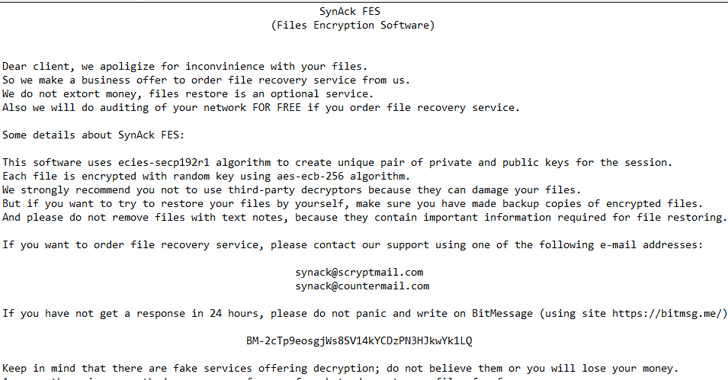
Security researchers at Kaspersky Lab have now found the first ransomware, a new variant of SynAck, employing this technique to evade its malicious actions and targeting users in the United States, Kuwait, Germany, and Iran.

Synack Ransomware process - Doppelganging

Initially discovered in September 2017, the SynAck ransomware uses complex obfuscation techniques to prevent reverse engineering, but researchers managed to unpack it and shared their analysis in a blog post.

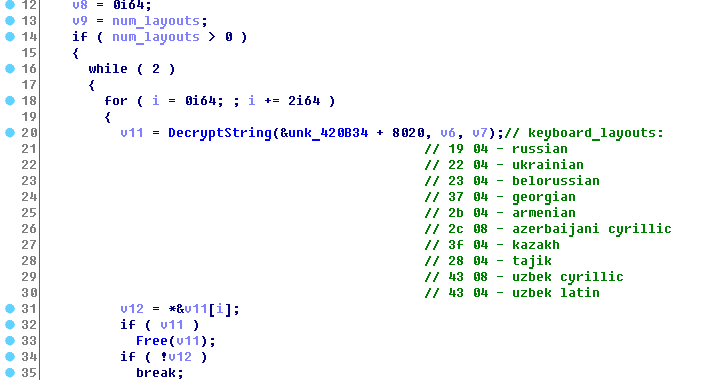
An interesting thing about SynAck is that this ransomware does not infect people from specific countries, including Russia, Belarus, Ukraine, Georgia, Tajikistan, Kazakhstan, and Uzbekistan.

To identify the country of a specific user, the SynAck ransomware matches keyboard layouts installed on the user’s PC against a hardcoded list stored in the malware. If a match is found, the ransomware sleeps for 30 seconds and then calls ExitProcess to prevent encryption of files.

SynAck ransomware also prevents automatic sandbox analysis by checking the directory from where it executes. If it found an attempt to launch the malicious executable from an ‘incorrect’ directory, SynAck won’t proceed further and will instead terminate itself.

Once infected, just like any other ransomware, SynAck encrypts the content of each infected file with the AES-256-ECB algorithm and provides victims a decryption key until they contact the attackers and fulfil their demands.

Synack Ransomware

SynAck is also capable of displaying a ransomware note to the Windows login screen by modifying the LegalNoticeCaption and LegalNoticeText keys in the registry. The ransomware even clears the event logs stored by the system to avoid forensic analysis of an infected machine.

Although the researchers did not say how SynAck lands on the PC, most ransomware spread through phishing emails, malicious adverts on websites, and third-party apps and programs.

Therefore, you should always exercise caution when opening uninvited documents sent over an email and clicking on links inside those documents unless verifying the source in an attempt to safeguard against such ransomware infection.

Although, in this case, only a few security and antivirus software can defend or alert you against the threat, it is always a good practice to have an effective antivirus security suite on your system and keep it up-to-date.

Last but not the least: to have a tight grip on your valuable data, always have a backup routine in place that makes copies of all your important files to an external storage device that isn’t always connected to your PC.

the hacker news

GravityRAT: the trojan with a unique trick for evading analysis

GravityRAT, a malware allegedly designed by Pakistani hackers, has recently been updated further and equipped with anti-malware evasion capabilites, Maharashtra cybercrime officials said.

The RAT was first detected by Indian Computer Emergency Response Team, CERT-In, on various computers in 2017. It is designed to infiltrate computers and steal the data of users, and relay the stolen data to Command and Control centres in other countries. The ‘RAT’ in its name stands for Remote Access Trojan, which is a program capable of being controlled remotely and thus difficult to trace.

Maharashtra cybercrime department officials said that the latest update to the program by its developers is part of GravityRAT’s function as an Advanced Persistent Threat (APT), which, once it infiltrates a system, silently evolves and does long-term damage.

“GravityRAT is unlike most malware, which are designed to inflict short term damage. It lies hidden in the system that it takes over and keeps penetrating deeper. According to latest inputs, GravityRAT has now become self aware and is capable of evading several commonly used malware detection techniques,” an officer of the cybercrime unit said.

One such technique is ‘sandboxing’, to isolate malware from critical programs on infected devices and provide an extra layer of security.

“The problem, however, is that malware needs to be detected before it can be sandboxed, and GravityRAT now has the ability to mask its presence. Typically, malware activity is detected by the ‘noise’ it causes inside the Central Processing Unit, but GravityRAT is able to work silently. It can also gauge the temperature of the CPU and ascertain if the device is carrying out high intensity activity, like a malware search, and act to evade detection,” another officer said.

Officials said that GravityRAT infiltrates a system in the form of an innocuous looking email attachment, which can be in any format, including MS Word, MS Excel, MS Powerpoint, Adobe Acrobat or even audio and video files.

“The hackers first identify the interests of their targets and then send emails with suitable attachments. Thus a document with ‘share prices’ in the file is sent to those interested in the stock market. Once it is downloaded, it prompts the user to enter a message in a dialogue box, purportedly to prove that the user is not a bot. While the users take this to be a sign of extra security, the action actually initiates the process for the malware to infiltrate the system, triggering several steps that end with GravityRAT sending data to the Command and Control server regularly,” an officer said.

The other concern is that the Command and Control servers are based in several countries. The data is sent in an encrypted format, making it difficult to detect exactly what is leaked.

Special Inspector General of Police (Cyber) Brijesh Singh of Maharashtra Police said, “We urge people to follow basic cyberhygiene like watching what they download, updating their anti-virus software and conducting cyber security reviews regularly.” CERT-In had issued an alert for it last year, with an advisory asking users to review cybersecurity measures and update anti-malware tools.

Avast reveals how attackers compromised CCleaner last year

Back in September last year, it was reported that popular system-cleaning tool CCleaner had been compromised by attackers for over a month. Some details of the incident were unclear at the time, but Avast, which acquired maker Piriform last July, has now revealed more information about what happened.

The attack saw hackers modify an updated version of CCleaner to include a malware backdoor. We knew there were 2.27 million downloads of the corrupted installation file worldwide, but how the attackers achieved this feat wasn’t specified at the time.

The security firm’s chief technology officer, Ondrej Vlcek, writes that the threat actors accessed Piriform’s network on March 11, 2017, four months before the company was taken over by Avast. The person or persons responsible somehow managed to get hold of stolen credentials to log into a TeamViewer remote desktop account on a developer PC.

“While we don’t know how the attackers got their hands on the credentials, we can only speculate that the threat actors used credentials the Piriform workstation user utilized for another service, which may have been leaked, to access the TeamViewer account,” he said.

The attackers installed the ShadowPad malware on two of the company’s compromised machines, before using its keylogger abilities to gain further access to Piriform’s systems. It wasn’t until August 2 that the first contaminated download of CCleaner appeared.

“Our investigation revealed that ShadowPad had been previously used in South Korea, and in Russia, where attackers intruded [on] a computer, observing a money transfer,” explained Vlcek.

Of the 2.27 million downloads of the affected program, a second stage attack—installing ShadowPad—took place on just 40 PCs, all of which belonged to tech and telecommunications companies. “We don’t have proof that a possible third stage with ShadowPad was distributed via CCleaner to any of the 40 PCs.”

Vlcek said that for Avast, there are two key takeaways from the attack. “First, M&A due diligence has to go beyond just legal and financial matters. Companies need to strongly focus on cybersecurity, and for us this has now become one of the key areas that require attention during an acquisition process.”

“Second, the supply chain hasn’t been a key priority for businesses, but this needs to change. Attackers will always try to find the weakest link, and if a product is downloaded by millions of users it is an attractive target for them. Companies need to increase their attention and investment in keeping the supply chain secure.”

TechSpot

Five Apps for Keeping Windows 10 Clean

Nobody likes an operating system that’s full of unnecessary stray files, 20 annoying apps that start up when you fire up your computer, and other crap that slows down your system, makes your desktop feel disorganised, or gives you a headache whenever you’re trying to work (or game). Thankfully, there are a number of free apps that can help you clean your Windows PC.

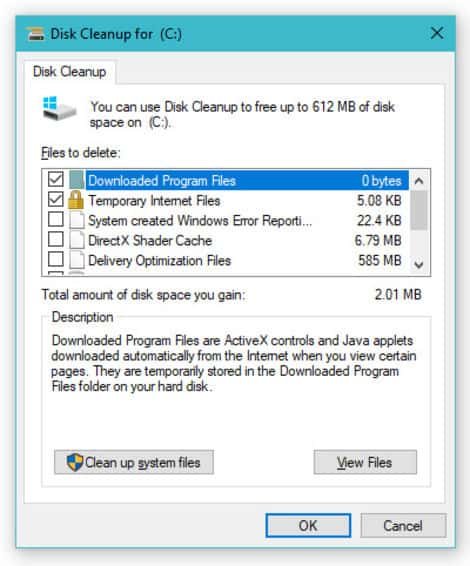
Disk Cleanup

Disk CleanupOne of the first apps you can try using to get control of a messy Windows PC is Windows’ very own Desk Cleanup app—built right into the operating system and free for you to use at any time. On Windows 10, just pull up the Start Menu and start typing in “Disk,” which should make it easy to load the utility. Pick a drive you want Disk Cleanup to take a look at, likely your system’s primary c:\ drive, and click OK.
Once it’s done scanning, Disk Cleanup will tell you about all the different kinds of files that you can safely remove from your system, including the cache for your Edge browser, anything in your Recycle Bin, temporary files left over from apps or app installations, and file thumbnails you might not need anymore—to name a few. You can also click on the “Clean up system files” option to have the app check for log files Windows created during an OS installation, as well as any previous Windows installations that might be lurking around your hard drive (and taking up gigabytes of space).

Once you’ve made your selections for deletion, click “OK,” and then “Delete Files,” to begin the process.

(You can also use a utility like BleachBit to give your drive a more thorough scrubbing. Just don’t use it to muck with your Windows registry; registry cleaners tend to have little noticeable effect, except for when they completely muck up your system by deleting something they shouldn’t have.)

The PC Decrapifier

The PC Decrapifier

Though this app is more useful for desktop or laptop PCs you just purchased, it’s a great tool for eliminating the more obvious bloatware on your system that, perhaps, you simply forgot about (or never had time to clean).

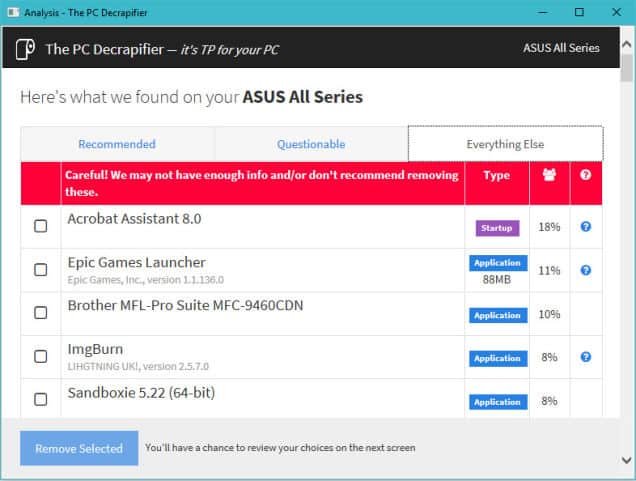
You don’t have to go through any installation routine once you’ve downloaded the app. Just launch it and let it analyze your system. It’ll split any apps it finds into three categories—apps definitely recommended for deletion, questionable apps that people usually remove from their systems, and all other apps. Each app listing tells you whether its a regular application you load yourself or one what starts when your computer launches, a percent that indicates how many other PC Decrapifier users also removed that app, and occasionally a little question mark icon that takes you to the web to learn more about a particular app.

All you have to do is select what you want to remove, confirm it on the next screen (which also allows you to create a Windows restore point if you’re feeling nervous), and let the app flush your unwanted apps down the digital drain.

AdwCleaner

AdwCleaner

Toolbars, spyware, and other kinds of malware can make your PC a mess. Even if you’re a semi-savvy computer user, however, you’re probably pretty good about avoiding the common traps: apps that solicit you to add crappy third-party items to their regular installation process or websites that cajole you to try out a scammy-sounding app—things like that.

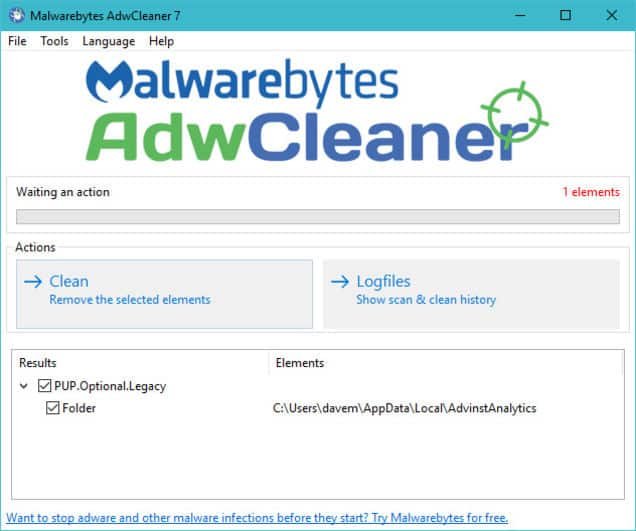
That said, it never hurts to run a quick scan every now and then to make sure there’s nothing on your computer that shouldn’t be there. You probably don’t need to pay for a real-time malware scanning app when you have something like AdwCleaner, a lightweight app that requires no installation to effectively (and efficiently) scan your system for crap.

The company that makes the ever-popular Malwarebytes anti-malware app owns AdwCleaner. While you can always switch up to the former for extra protection, given its reputation, the app feels a little more bloaty and definitely loves to let you know about its Premium services.

Steam Cleaner

Steam Cleaner

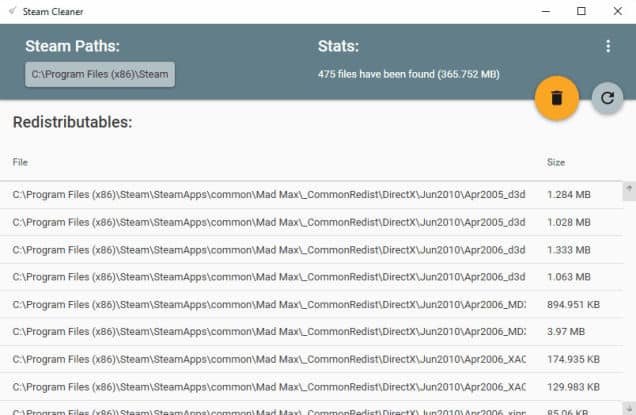
This one’s for you, gamers. You might not even know that the major online distribution services—Steam, Origin, Uplay, and GoG—might leave some crap on your hard drive even after you’ve uninstalled a game you’re done playing. Even though this app is called “Steam Cleaner,” it does a great job of scanning through each service’s default installation folders and identifying leftover files from past games that you can safely remove. With some simple scanning, you could save gigabytes of space.

(For regular apps, consider using a program like Revo Uninstaller to ensure that all traces of a program are deleted whenever you want to remove it from your system.)

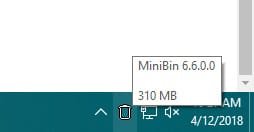
MiniBin

MiniBinHaving to navigate to your Windows desktop to fiddle with your Recycle Bin is annoying. While it’s easy to delete (or shift-delete) files from File Explorer, it’s always nice to have a trash can at the ready. This tiny utility drops a Recycle Bin directly in your system tray, which makes it much easier to drag-and-drop files to oblivion, empty the trash, and restore that which you accidentally deleted.


lifehacker

Cisco Switches in Iran, Russia Hacked in Apparent Pro-US Attack

Hacked Cisco Switch

A significant number of Cisco switches located in Iran and Russia have been hijacked in what appears to be a hacktivist campaign conducted in protest of election-related hacking. However, it’s uncertain if the attacks involve a recently disclosed vulnerability or simply abuse a method that has been known for more than a year.

Cisco devices belonging to organizations in Russia and Iran have been hijacked via their Smart Install feature. The compromised switches had their IOS image rewritten and their configuration changed to display a U.S. flag using ASCII art and the message “Don’t mess with our elections…”

The hackers, calling themselves “JHT,” told Motherboard that they wanted to send a message to government-backed hackers targeting “the United States and other countries.” They claim to have only caused damage to devices in Iran and Russia, while allegedly patching most devices found in countries such as the U.S. and U.K.

Iran’s Communication and Information Technology Ministry stated that the attack had impacted roughly 3,500 switches in the country, but said a vast majority were quickly restored.

Kaspersky Lab reported that the attack appeared to mostly target the “Russian-speaking segment of the Internet.”

While there are some reports that the attack involves a recently patched remote code execution vulnerability in Cisco’s IOS operating system (CVE-2018-0171), that might not necessarily be the case.

The Cisco Smart Install Client is a legacy utility that allows no-touch installation of new Cisco switches. Roughly one year ago, the company warned customers about misuse of the Smart Install protocol following a spike in Internet scans attempting to detect unprotected devices that had this feature enabled.

Attacks, including ones launched by nation-state threat actors such as the Russia-linked Dragonfly, abused the fact that many organizations had failed to securely configure their switches, rather than an actual vulnerability.

Cisco issued a new warning last week as the disclosure of CVE-2018-0171 increases the risk of attacks, but the networking giant said it had not actually seen any attempts to exploit this vulnerability in the wild. Cisco’s advisory for this flaw still says there is no evidence of malicious exploitation.

There are hundreds of thousands of Cisco switches that can be hijacked by abusing the Smart Install protocol, and Cisco Talos experts believe attackers are unlikely to bother using CVE-2018-0171.

The Network Security Research Lab at Chinese security firm Qihoo 360 says the data from its honeypot shows that the attacks have “nothing to do with CVE-2018-0171” and instead rely on a publicly available Smart Install exploitation tool released several months ago.

While none of the major players in the infosec industry have confirmed that the attacks on Iran and Russia rely on CVE-2018-0171, technical details and proof-of-concept (PoC) code have been made available by researchers, making it easier for hackers to exploit.

Hamed Khoramyar, founder of Sweden-based ICT firm Aivivid, said the attacks exploited CVE-2018-0171. Kudelski Security also reported seeing attacks involving both CVE-2018-0171 and another recently disclosed IOS vulnerability tracked as CVE-2018-0156. However, Kudelski’s blog post also lists Khoramyar as one of its sources.

Security Week

Facebook’s Cambridge Analytica data scandal, explained

Cambridge Analytica improperly obtained data from as many as 50 million people. That’s put Mark Zuckerberg on the defensive.
The Verge

Google shutting down goo.gl URL shortener next year

google shortener

The goo.gl link is very common on the web and was first launched by Google in 2009. However, the company announced on Friday, March 30, 2018, that it’s winding down the URL Shortener beginning next month, with a complete deprecation by next year. Fortunately, existing links will continue to work.

The URL shortener service launched in 2009 for FeedBurner and the Google Toolbar. With neither of those services available, the same is now happening to goo.gl for both consumers and developers. The latter group is being directed to Firebase Dynamic Links with the announcement meant to “refocus” Google’s efforts.

many popular URL shortening services have emerged and the ways people find content on the Internet have also changed dramatically, from primarily desktop webpages to apps, mobile devices, home assistants, and more.

However, for average users that just want to truncate a link, there is no new alternative from the company, with Google suggesting Bitly and Ow.ly.

Starting on April 13, 2018, new and anonymous users will no longer be able to reach the goo.gl console to create short links. However, existing users will have access to all features like creation, management, and analytics until March 30, 2019, when the console will be discontinued.

Google notes “all links will continue to redirect to the intended destination” even after 2019, with users also able to export link information from the console.

Developers are encouraged to switch over to Firebase Dynamic Links that have the advantage of automatically detecting the user’s platform and send the user to either the web or your app.

URL Shortener has been a great tool that we’re proud to have built. As we look towards the future, we’re excited about the possibilities of Firebase Dynamic Links, particularly when it comes to dynamic platform detection and links that survive the app installation process. We hope you are too!

9 to 5 Google

Microsoft Issues Emergency Windows Security Update For A Critical Vulnerability

If your computer is running Microsoft’s Windows operating system, then you need to apply this emergency patch immediately. By immediately, I mean now!

Microsoft has just released an emergency security patch to address a critical remote code execution (RCE) vulnerability in its Malware Protection Engine (MPE) that could allow an attacker to take full control of a victim’s PC.

Enabled by default, Microsoft Malware Protection Engine offers the core cybersecurity capabilities, like scanning, detection, and cleaning, for the company’s antivirus and antimalware programs in all of its products.

According to Microsoft, the vulnerability affects a large number of Microsoft security products, including Windows Defender and Microsoft Security Essentials along with Endpoint Protection, Forefront Endpoint Protection, and Exchange Server 2013 and 2016, impacting Windows 7, Windows 8.1, Windows 10, Windows RT 8.1, and Windows Server.

Tracked as CVE-2017-11937, the vulnerability is a memory corruption issue which is triggered when the Malware Protection Engine scans a specially crafted file to check for any potential threat.

Flaw Lets Hackers Take Full Control of Your Computer

Successful exploitation of the flaw could allow a remote attacker to execute malicious code in the security context of the LocalSystem account and take control of the target’s computer.

Microsoft said an attacker could place a specially crafted malicious file in a location that is scanned by the Malware Protection Engine to exploit the memory corruption flaw which eventually leads to remote code execution.

“There are many ways that an attacker could place a specially crafted file in a location that is scanned by the Microsoft Malware Protection Engine. For example, an attacker could use a website to deliver a specially crafted file to the victim’s system that is scanned when the website is viewed by the user,” the report from Microsoft explained.

Other ways to deliver a specially crafted file could be via emails or Instant Messenger services. The attacker could also “take advantage of websites that accept or host user-provided content, to upload a specially crafted file to a shared location that is scanned by the Malware Protection Engine running on the hosting server,” the report said.

Patch! Patch! Patch!

Microsoft assured its customers that the vulnerability was fixed before any misuses in the wild.

The company has released an out-of-band critical update for the flaw and advised users to install it as soon as possible. Most home users and many enterprise customers will get the emergency patch automatically over the air.

The security vulnerability was discovered and reported to Microsoft by the UK’s National Cyber Security Centre (NCSC), a cyber defense organization of Britain’s signals intelligence and cybersecurity agency, known as GCHQ.

The emergency fix comes just days before Microsoft is scheduled to roll out its December Patch Tuesday updates.

The Hacker News