Twitter has removed over 1.2 million accounts for promoting terrorism

Twitter released its biannual Transparency Report today and it shared stats on how it continues to handle terrorist content. Overall, since August of 2015, twitter has removed over 1.2 million accounts that promoted terrorism. During the second half of last year, it permanently suspended 274,460 accounts for this reason, which is slightly less than what was removed during the first half of 2017. Twitter notes that it has now seen a decline in these sorts of removals across three reporting periods and it attributes that pattern to “years of hard work making our site an undesirable place for those seeking to promote terrorism.”

Of those accounts that were removed between July 1st and December 31st last year, 93 percent were flagged by Twitter’s internal tools and algorithms. Around 74 percent were suspended before ever tweeting — stats that are in line with Twitter’s report from the first half of 2017 as well. Government reports of violations are still on the decline. Last September, Twitter reported that government-originating reports accounted for less than one percent of removals. Now, they account for less than 0.2 percent.

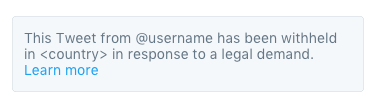
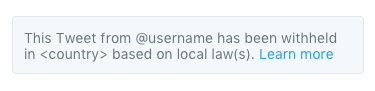
In addition to the terrorist content updates, Twitter also shared information on some changes it has made to how it notes when content is being withheld. It’s now differentiating when content is being blocked due to a court order or because of local laws. The Transparency Report also notes that there was a 38 percent increase between the first and second half of 2017 regarding copyright violation takedown notices for both Twitter and Periscope. There was an 18 percent decrease in trademark violation notices.

Twitter makes a point to note the efforts of governments to limit online speech. “With the passage of new legislation and ongoing regulatory discussions taking place around the world about the future of public discourse online, we are seeing a potential chilling effect with regards to freedom of expression,” Twitter said in a blog post. To address that, Twitter says it uploads request for content withholding to the Lumen database, which collects and analyzes these sorts of requests. “Lumen serves as a critical transparency resource as more freedom of expression comes under fire, by making such requests available for public review,” said Twitter.

Lastly, Twitter reiterated its effort to “increase the collective health, openness and civility of public conversation around the world, and to hold ourselves publicly accountable toward progress.” In regards to that, Twitter also recently hosted a Periscope livestream, taking questions from the public about its policies, and launched a request for public proposals on how to promote healthy, open and civil conversations on its platform.

Engadget

School dropout makes it to Forbes’ U-30 list

Chandigarh, April 3 (IANS) A school dropout from Chandigarh who is now a cyber security expert has made it to the Forbes “30 under 30” Asia 2018 list.

Trishneet Arora, 25, made his way to the prestigious list which is packed with innovators and disruptors who are reshaping their industries and changing Asia for the better, a spokesperson for the young entrepreneur said here on Tuesday.

Arora is cyber security expert, an author and the founder and CEO of TAC Security — a Cyber-Security company based in Mohali, adjoining Chandigarh.

TAC Security performs vulnerability assessment and penetration testing for corporates, identifying weaknesses in their cyber security.

“In 2017, Arora was listed among the 50 Most Influential Young Indians by GQ Magazine. He has received funding from investor Vijay Kedia and support from former vice president of IBM, William May,” the spokesperson said.

His name now figures in the Enterprise Technology category of the Forbes “30 under 30” Asia 2018 list.

Besides young international personalities from across the world, international badminton player P.V Sindhu from India is part of the Forbes Asia “30 under 30” list under a different category.

TAC Security helps corporates recognise their weaknesses before fraudulent hackers can use them adversely. It helps to protect networks and information assets from malicious activity such as cyber-attacks. TAC is also responsible for security assessment for 50+ UPI based applications.

Chrome Is Scanning Files on Your Computer

The browser you likely use to read this article scans practically all files on your Windows computer. And you probably had no idea until you read this. Don’t worry, you’re not the only one.

Last year, Google announced some upgrades to Chrome, by far the world’s most used browser—and the one security pros often recommend. The company promised to make internet surfing on Windows computers even “cleaner” and “safer ” adding what The Verge called “basic antivirus features.” What Google did was improve something called Chrome Cleanup Tool for Windows users, using software from cybersecurity and antivirus company ESET.

Tensions around the issue of digital privacy are understandably high following Facebook’s Cambridge Analytica scandal, but as far as we can tell there is no reason to worry here, and what Google is doing is above board.

In practice, Chome on Windows looks through your computer in search of malware that targets the Chrome browser itself using ESET’s antivirus engine. If it finds some suspected malware, it sends metadata of the file where the malware is stored, and some system information, to Google. Then, it asks you to for permission to remove the suspected malicious file. (You can opt-out of sending information to Google by deselecting the “Report details to Google” checkbox.)

A screenshot of the Chrome pop-up that appears if Chrome Cleanup Tool detects malware on your Windows computer.

A screenshot of the Chrome pop-up that appears if Chrome Cleanup Tool detects malware on your Windows computer.

Last week, Kelly Shortridge, who works at cybersecurity startup SecurityScorecard, noticed that Chrome was scanning files in the Documents folder of her Windows computer.

“In the current climate, it really shocked me that Google would so quietly roll out this feature without publicizing more detailed supporting documentation—even just to preemptively ease speculation,” Shortridge told me in an online chat. “Their intentions are clearly security-minded, but the lack of explicit consent and transparency seems to violate their own criteria of ‘user-friendly software’ that informs the policy for Chrome Cleanup [Tool].”

Her tweet got a lot of attention and caused other people in the infosec community—as well as average users such as me—to scratch their heads.

“Nobody likes surprises,” Haroon Meer, the founder at security consulting firm Thinkst, told me in an online chat. “When people fear a big brother, and tech behemoths going too far…a browser touching files it has no business to touch is going to set off alarm bells.”

Now, to be clear, this doesn’t mean Google can, for example, see photos you store on your windows machine. According to Google, the goal of Chrome Cleanup Tool is to make sure malware doesn’t mess up with Chrome on your computer by installing dangerous extensions, or putting ads where they’re not supposed to be.

As the head of Google Chrome security Justin Schuh explained on Twitter, the tool’s “sole purpose is to detect and remove unwanted software manipulating Chrome.” Moreover, he added, the tool only runs weekly, it only has normal user privileges (meaning it can’t go too deep into the system), is “sandboxed” (meaning its code is isolated from other programs), and users have to explicitly click on that box screenshotted above to remove the files and “cleanup.”

In other words, Chrome Cleanup Tool is less invasive than a regular “cloud” antivirus that scans your whole computer (including its more sensitive parts such as the kernel) and uploads some data to the antivirus company’s servers.

But as Johns Hopkins professor Matthew Green put it, most people “are just a little creeped out that Chrome started poking through their underwear drawer without asking.”

That’s the problem here: most users of an internet browser probably don’t expect it to scan and remove files on their computers.

When reached out for comment, a Google spokesperson redirected me to the blog post from last year and Schuh’s tweets.

A section in Chrome’s Privacy Whitepaper explains that “Chrome periodically scans your device to detect potentially unwanted software.” That exact language has been there since at least January of 2017, according to archived versions of the whitepaper. And similar language (“Chrome scans your computer periodically for the sole purpose of detecting potentially unwanted software”) has been there for even longer.

Martijn Grooten, the editor of Virus Bulletin and organizer of one of the premiere antivirus conferences in the world, told me in a Twitter chat that the behavior of the Chrome Cleanup Tool was “sensible.”

“For almost all users, this seems really harmless, and for those who are extremely concerned about Google seeing some metadata, maybe they shouldn’t be running Google’s browser in the first place,” he said.

Motherboard

Google shutting down goo.gl URL shortener next year

google shortener

The goo.gl link is very common on the web and was first launched by Google in 2009. However, the company announced on Friday, March 30, 2018, that it’s winding down the URL Shortener beginning next month, with a complete deprecation by next year. Fortunately, existing links will continue to work.

The URL shortener service launched in 2009 for FeedBurner and the Google Toolbar. With neither of those services available, the same is now happening to goo.gl for both consumers and developers. The latter group is being directed to Firebase Dynamic Links with the announcement meant to “refocus” Google’s efforts.

many popular URL shortening services have emerged and the ways people find content on the Internet have also changed dramatically, from primarily desktop webpages to apps, mobile devices, home assistants, and more.

However, for average users that just want to truncate a link, there is no new alternative from the company, with Google suggesting Bitly and Ow.ly.

Starting on April 13, 2018, new and anonymous users will no longer be able to reach the goo.gl console to create short links. However, existing users will have access to all features like creation, management, and analytics until March 30, 2019, when the console will be discontinued.

Google notes “all links will continue to redirect to the intended destination” even after 2019, with users also able to export link information from the console.

Developers are encouraged to switch over to Firebase Dynamic Links that have the advantage of automatically detecting the user’s platform and send the user to either the web or your app.

URL Shortener has been a great tool that we’re proud to have built. As we look towards the future, we’re excited about the possibilities of Firebase Dynamic Links, particularly when it comes to dynamic platform detection and links that survive the app installation process. We hope you are too!

9 to 5 Google

Facebook is hosting an online abuse summit with other tech leaders

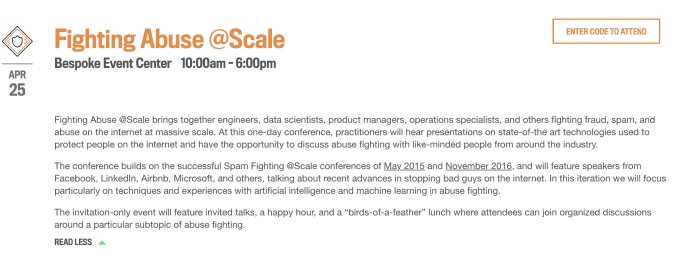
Desperate to show it takes thwarting misinformation, fraud and spam seriously, Facebook just revealed that it’s hosting a private “Fighting Abuse @Scale” invite-only conference in San Francisco on April 25th. Speakers from Facebook, Airbnb, Google, Microsoft and LinkedIn will discuss how to stop fake news, prevent counterfeit account creation, use honeypots to disrupt adversarial infrastructure and how machine learning can be employed to boost platform safety.

Facebook Event: fighting abuse Though never publicly announced, Facebook has already privately filled the event to capacity. The company’s PR says this isn’t a “last-minute” event as we originally described it, and initial invites went out February 6th. But the sudden move to invite journalists less than a month ahead seems timed to humanize Facebook’s efforts to combat its ongoing data abuse and election interference scandals.

Fighting Abuse @Scale will be held at the Bespoke Event Center within the Westfield Mall in SF. We can expect more technical details about the new proactive artificial intelligence tools Facebook announced today during a conference call about its plans to protect election integrity. The first session is titled “Combating misinformation at Facebook” and will feature an engineering director and data scientists from the company.

Facebook previously held “Fighting Spam @Scale” conferences in May 2015 and November 2016 just after the presidential election. But since then, public frustration has built up to a breaking point for the social network. Russian election interference, hoaxes reaching voters, violence on Facebook Live, the ever-present issue of cyberbullying and now the Cambridge Analytica data privacy scandal have created a convergence of backlash. With its share price plummeting, former executives speaking out against its impact on society and CEO Mark Zuckerberg on a media apology tour, Facebook needs to show this isn’t just a PR problem. It needs users, potential government regulators, and its own existing and potential employees to see it’s willing to step up and take responsibility for fixing its platform.

tech crunch

New Mac Malware Hijacks Web Connections: What to Do

“2018 is barely two weeks old, and already it looks like we’ve got new piece of macOS malware! Hooray :)”

That’s how Apple-focused security researcher Patrick Wardle opened a blog post on Jan. 11, detailing what Wardle calls “MaMi,” a stealthy DNS hijacker that reroutes your internet traffic to possibly malicious websites.

MaMi also has abilities that haven’t yet been activated: It can steal passwords, take screenshots, download files and programs, run other pieces of software and inject bogus security certificates.

Check If You’re Infected

To see whether your Mac was infected by MaMi, go to System Preferences, click on the Network section and check the IP address of your DNS server. If it’s “82.163.143.135” or “82.163.142.137,” then you’ll need to change it to something benign, such as Google’s 8.8.8.8 or 8.8.4.4 or OpenDNS’s 208.67.2222.222 or 208.67.220.220.

Notice we said “was” infected. The MaMi sample that Wardle found deleted itself after changing the DNS settings on his test machine, so even if you found a smoking-gun DNS setting, the malware that did it may be long gone.

How to Prevent Infection

To prevent infection by MaMi, use common sense. Every piece of Mac malware found in recent years has required user approval, presumably unwitting, to be installed.

So don’t authorize that Adobe Flash Player update, that video player you apparently need to see a clip of a naked celebrity, or that antivirus software that showed up in a pop-up window telling you your Mac was infected. Instead, hold off and get Mac antivirus software straight from the source.

It’s not yet known how MaMi (named after a text string Wardle found in the code) infects a Mac, though Wardle suspects “rather lame methods such as malicious email, web-based fake security alerts/popups or social-engineering type attacks.” But as of this writing, only one antivirus scanning engine in the online VirusTotal repository detects MaMi through the usual file-matching methods.

How MaMi Malware Works

DNS servers are the phone books of the internet. They match human requests with network addresses  so that, among other things, you can see this website in your web browser.

DNS hijacking sends a computer to a malicious DNS server that could, for example, send you to an evil version of Tom’s Guide that could infect you with even more malware.

It’s not clear how widespread MaMi is so far. Wardle was tipped off to it by a posting on a Malwarebytes forum, but didn’t explain how he located his own copy. Wardle did point to a website that automatically downloaded the binary to our computer when we connected. (We’re using a Windows PC, so the malware didn’t do anything to us.)

tomsguide.com

This Is The Man Who Deactivated Trump’s Twitter Account

The contractor who deactivated President Donald Trump’s Twitter account earlier this month has revealed himself and calls the move a mistake.

Twitter had declined to identify the man, but TechCrunch reported Wednesday that he is Bahtiyar Duysak, a 20-something German citizen of Turkish descent. Duysak worked in customer support with the Trust & Safety division, the team that reviews alerts of bad behavior on the platform, TechCrunch said.

Duysak told TechCrunch he was near the end of his last day working for Twitter when an alert came in about Trump’s account. As a final gesture, he started the process of deactivating the account, closed his computer and left the building.

He didn’t expect the process to actually be completed, he said, but it was. For about 11 minutes on the afternoon of Nov. 2, visitors to Trump’s account found a message saying the page didn’t exist. Twitter initially said the account had been “inadvertently deactivated due to human error” but later placed the blame on a customer service employee who was working a final shift at the company.

Duysak called the move a mistake and suggested a “number of coincidences” might also have played a role, though he didn’t describe those coincidences.

“I had a wild time in America,” Duysak said. “I was tired sometimes. And everyone can do mistakes. I did a mistake.”

After the incident, questions lingered about how the employee had that level of access to be able to delete an account, or what other sorts of tampering might be possible. Buzzfeed News cited a “former senior employee” of Twitter describing relatively easy access to certain account controls. The New York Times said that while “hundreds of employees” can take actions such as disabling accounts, customer service workers cannot access direct messages or tweet through other people’s accounts.

“I didn’t hack anyone,” Duysak goes on to say. “I didn’t do anything that I wasn’t authorized to do.”

Twitter declined to confirm that Duysak was responsible for the deletion but said the company has “taken a number of steps to keep an incident like this from happening again.”

cnet

Watch out: These phishing emails claiming to be a ‘secure message’ from your bank

Cyber criminals are faking secure messages from banks as a means of delivering malware to victims.

Often provided through an online portal, banks often provide secure messaging services for the purposes of communicating with the bank without having to pick up the phone or visit the a branch.

Hackers have realised that this provides a new method of attack and are now crafting spoof emails claiming to contain documentation relating to secure messages.

The sorts of clients who opt to use these secure messaging services are often high-value targets who already have a trusting online relationship with their bank – so could be more willing to follow instructions they get in an email from scammers that they believe to be real.

Criminals are registering domains that appear to look like legitimate bank domains and the fact they’re fake goes unnoticed because users don’t know how to spot an imposter or their email client doesn’t show the full domain in the subject line.

Uncovered by security researchers at Barracuda Networks, the campaign uses phishing emails to impersonate customers of big banks including Bank of America and TD Commercial banking.

The spoof messages are designed in such a way so as to look legitimate, even featuring sender addresses which look as if they come from the institution.

In some instances, the messages simply ask the victim to click on and download and attached document. However, others keep up the façade of being ‘secure’ – some emails provide instructions about using an authorization code to ‘unlock’ the attachment.

The malicious payload within is able to rewrite the files in the users’ directory on Windows machines once the victim opens the document – and this script can potentially missed by anti-virus software, thrown off the scent because they think the document is benign.

However, once downloaded onto the system, criminals have access to it and can update the script at a later date to become something more malicious, such as credential stealing malware – enabling them to stealthily gain access to the bank account of the victim – or something more brazen like ransomware.

Faking email messages might seem like a basic attack, but criminals are deploying this tactic because it works – especially when trusted institutions such as banks are used.

However, the good news is that users can be trained to spot phishing attacks – taking a step back and assessing the legitimacy of an email can go a long way towards protecting an individual or their organisation from falling victim to hackers.

zdnet

New Bluetooth vulnerability can hack a phone in 10 seconds

More than 5.3 billion devices with Bluetooth signals are at risk of a malware attack newly identified by an internet of things security company.

If you’re not keeping count, that’s most of the estimated 8.2 billion devices that use Bluetooth, which allows for our gadgets to connect and communicate wirelessly. Nearly every connected device out there has Bluetooth capability. Your phones, laptops, speakers, car entertainment systems — the list goes on and on to even the most mundane gadgets.

Because those devices can connect to others effortlessly, Bluetooth has left an open attack point for hackers, according to researchers at Armis Labs. The attack method, which they’re calling BlueBorne, is especially dangerous because it can spread without the victim doing anything or noticing it.

In a lot of cases, malware depends on people clicking on a link they shouldn’t have, or downloading a virus in disguise. With BlueBorne, all hackers need to spread malware is for their victims’ devices to have Bluetooth turned on, said Nadir Izrael, Armis’ chief technology officer.

And once one device has been infected, the malware can spread to other devices nearby with the Bluetooth turned on. By scattering over the airwaves, BlueBorne is “highly infectious,” Armis Labs said.

“We’ve run through scenarios where you can walk into a bank and it basically starts spreading around everything,” Izrael said.

The attack echoes the way the WannaCry ransomware spread earlier this year. WannaCry allegedly used the NSA’s EternalBlue vulnerability and infected computers on the same network, even though they never downloaded the virus. That ransomware infected hundreds of thousands of computers within several hours.

Ben Seri, Armis Labs’ head of research, fears that BlueBorne will lead to a similar massive outbreak. In several trials testing out BlueBorne, researchers were able to create botnets and install ransomware using Bluetooth, all under the radar of most protection.

“Imagine there’s a WannaCry on Bluetooth, where attackers can deposit ransomware on the device, and tell it to find other devices on Bluetooth and spread it automatically,” said Michael Parker, the company’s vice president of marketing.

BlueBorne is a collection of eight zero-day vulnerabilities that Armis Labs discovered. Zero-day vulnerabilities are security flaws that are found before developers have a chance to fix them. That kind of exploit lets hackers execute malware remotely, steal data and pretend to be a safe network as a “man in the middle” attack.

It does this by taking advantage of how your Bluetooth uses tethering to share data, the company said. It’s able to spread through “improper validation,” Izrael said. The vulnerability affects devices on most operating systems, including those run by Google, Microsoft and Apple.

The three companies have released patches for the vulnerability. Apple confirmed that BlueBorne is not an issue for its mobile operating system, iOS 10, or later, but Armis noted that all iOS devices with 9.3.5 or older versions are vulnerable. Microsoft released a patch for its computers in July, and anybody who updated would be protected automatically, a spokesman said. Google said Android partners received the patch in early August, but it’s up to the carriers to release the updates. Pixel devices have already received the updates.

Of the 2 billion devices using Android, about 180 million are running on versions that will not be patched, according to Armis.

The concern is the multitude of devices that will not be getting updates. Google, Microsoft and Apple are tech titans that regularly update their products for security. But updates might not be as frequent for single-purpose smart devices like your smart refrigerator or a connected television.

Of the potentially impacted devices, Armis Labs estimated that 40 percent are not going to be patched. That’s more than 2 billion devices that will be left vulnerable to attacks, they warned.

“We’re looking at a forever-day scenario for many of these devices,” Parker said.

You can turn off your Bluetooth to prevent attacks if you won’t receive the patch, Armis advised.

cnet