Avoid These Corrupted Chrome Extensions (For Now)

Chrome browser extensions are beautiful things. They can translate pages, help you manage your passwords and even get rid of unpleasant words. However, they’re also prime vectors for all kinds of unpleasant malicious code.

Usually, it’s easy enough to sort out genuine Chrome extensions from their shady brethren, but what happens when good plugins go bad? At least eight Chrome extension developers have fallen prey to phishing schemes, had their Chrome developer accounts hijacked and their extensions altered. Their once-legitimate Chrome extensions now threaten millions of people, and it’s likely more Chrome extension hijacks will come to light.

The French security researcher known only as “Kafeine” discovered six new compromised extensions, adding to two more discovered earlier this month, and shared his findings on the Proofpoint website Monday (Aug. 14). The six otherwise-helpful Chrome extensions are currently spamming users with malicious popups and redirected advertisements, and it’s likely that all eight developers fell for the same phishing scheme.

First things first: If you have one of the corrupted extensions, you should uninstall or disable it right away. (However, you should also bookmark the developer’s homepage, blog or Twitter account so that you know when it’s safe to reinstall.) It doesn’t matter if you’re using Windows, macOS or Linux, as Chrome extensions are generally platform-independent.

The version numbers for four of the compromised extensions are as follows:

  • Chrometana 1.1.3
  • Infinity New Tab 3.12.3
  • Web Paint 1.2.1
  • Social Fixer 20.1.1

Two more extensions appear to have been compromised at the end of June, but the exact version numbers of the corrupted code are unverified:

  • TouchVPN [current version 1.5.12, last updated June 25]
  • Betternet VPN [current 4.4.5, last updated July 6]

Bleeping Computer estimates that almost 5 million people may be at risk from these extensions.

Two additional apps, Copyfish and Web Developer, fell prey to the exact same method of hijacking earlier this month. However, those two apps have since been updated, and should be safe to use once again.

The corrupted Chrome extensions are not dangerous in and of themselves, but use them long enough, and they can almost certainly compromise your computer.

Rather than infecting systems themselves, the extensions redirect users to malicious websites that can do it for them. The compromised extensions spam users with popups, which exhort them to click on harmful sites. Furthermore, they replace legitimate advertisements with ones that have much more unscrupulous destinations.

As for how the extensions became corrupted in the first place, it’s a surprisingly simple story: The developers got phished. The men and women behind the Chrome extensions received extremely convincing emails from a Google lookalike, explaining that they had to log into their Google developer accounts immediately or risk losing valuable assets. The link and email address both looked convincing, and the message did not contain any spelling or grammatical errors.

Once the developers “logged in,” the attackers had their Google developer-account username and passwords. From there, the attackers changed the code of the developers’ extensions and pushed out updates.

The lesson here is not “don’t use Google Chrome Extensions,” since they’re generally helpful, reliable bits of software. Instead, perhaps, users may want to follow their favorite extension developers on Twitter to be notified of potential security breaches like this one ASAP. Keeping extensions up to date (which Chrome does automatically by default) and having a reliable antivirus program installed never hurt, either.

tom's guide

Apple removes VPN apps from the App Store in China

The Chinese government’s crackdown on the internet continues with the news that Apple has removed all major VPN apps, which help internet users overcome the country’s censorship system, from the App Store in China.

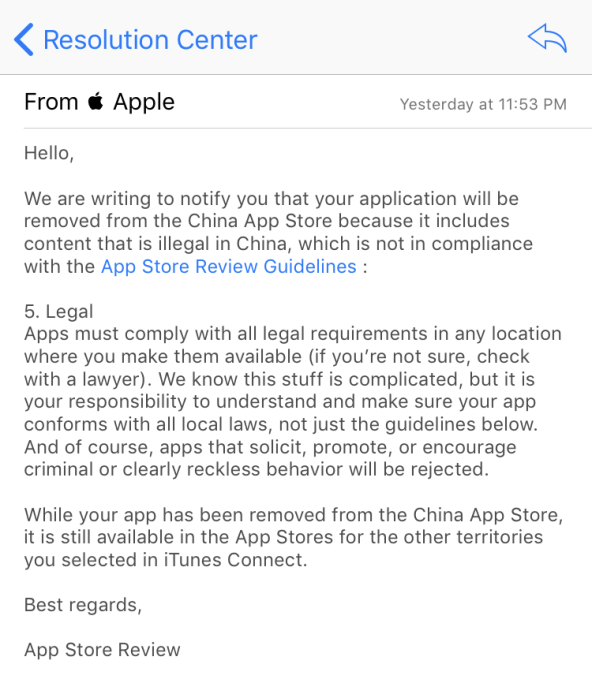
The move was first noted by ExpressVPN, a provider based outside of China, which said in a blog post “all major VPN apps” including its own had been purged from Apple’s China-based store. The company shared a note from Apple (below) explaining that its app was removed because “it includes content that is illegal in China.”

The app continues to be available for users across the world outside of China, the company said. However, the process to create an App Store account in a different country is unknown to many users, so it is unlikely to fill the void of the missing Chinese app.

Another provide, Star VPN, tweeted that its app had also been removed.

Apple had not replied for comment at the time of writing.

ExpressVPN shared a note from Apple notifying it of the removal of its app in China

The App Store purge is hugely impactful because VPNs represent the only way that a China-based individual can bypass state censorship controls to access the internet without restrictions. The Chinese government effectively illegalized VPNs when new rules issued in January required them to receive government approval in order to operate. That appears to be why Apple was forced to remove ExpressVPN and others like it.

Apple may believe it is best for its business to co-operate with requests from Beijing, but this App Store purge just created one of the biggest setbacks for the free internet in China’s history.

“We’re disappointed in this development, as it represents the most drastic measure the Chinese government has taken to block the use of VPNs to date, and we are troubled to see Apple aiding China’s censorship efforts. ExpressVPN strongly condemns these measures, which threaten free speech and civil liberties,” ExpressVPN wrote on its blog.

Today’s news is the latest in a series of developments against the free internet from China.

Two popular VPN services were forced offline in China earlier this month leaving their users, which included professionals who require access to the global internet for work, without an alternative. Government officials denied a story from Bloomberg that the country’s mobile operators had been told to ban VPN apps by early 2018, but other steps have clearly been taken. Reuters reported earlier this month that the Great Firewall, the term for China’s internet censorship apparatus, had been “upgraded” with new capabilities. VPN services subsequently found that they had been hit by the most sophisticated attacks from China to date. High-end hotels have even ceased offer VPNs to guests.

Those new capability apparently also made it possible for the government to interfere with messaging apps. While now blocked entirely, WhatsApp users found that they were unable to send videos and photos through the chat app and issues seemed to extend to WeChat, China’s most popular messaging service. The censorship seemed to be linked to the response to the death of dissident Liu Xiaobo, a recipient of the Nobel Peace Prize, who lost a battle to liver cancer earlier this month having been denied permission to leave custody to seek medical treatment overseas.

Going direct to Apple is becoming an effective way to enforce censorship since the U.S. firm controls what apps are available in China. The tactic proved successful for China earlier this year when Apple removed the New York Times app from the local Chinese App Store. The Times and Wall Street Journal are among a number of international news sites blocked in China, according to censorship monitoring service Great Fire.

It’s unclear whether similar action has been taken with Android stores in China. The Google Play Store is not present in China, where a handful of third-party app stores are the most influential distributors of Android apps.

Not-for-profit group GreatFire offers ‘censorship-proof’ alternatives like its Android VPN FreeBrowser and other services that include a collaboration with The New York Times, but Apple’s iOS doesn’t permit similar options.

Apple just announced Isabel Ge Mahe as the first managing director for its Chinese business and, beyond battling a sales slump in China, the long-time Apple executive is tasked with the difficult job of managing a relationship with Beijing. The U.S. firm recently announced plans to develop its first China-based data center, a move that is thought to be related to the country’s new cybersecurity laws which went into effect June 1.

tech crunch

TNT parcels ‘backed up to ceiling’ in wake of massive cyberattack

Parcels are backing up at TNT depots in their thousands after the company admitted it is still struggling to deal with the aftermath of June’s cyber-attack that crippled IT systems around the world.

Frustrated customers trying to get news of their undelivered parcels have been told by TNT’s UK staff that consignments at its East Midlands hub are “going up to the ceiling” as international shipments are still having to be processed by hand.

TNT was one of thousands of big businesses and other organisations hit by the ransomware attack known as “NotPetya” at the end of June. At least 2,000 individuals and organisations worldwide were affected by the attack, which began in the Ukraine.

Most organisations were up and running again within days and hours. But the full scale of the attack’s impact and resulting losses to some big businesses are only now starting to emerge.

On Monday the consumer group Reckitt Benckiser, the maker of Durex and Nurofen, blamed the same IT attack for a 2% fall in second quarter like-for-like sales. TNT’s parent company, FedEx, has already been forced to warn the New York stock exchange that its earnings would be “materially” down as a result of the attack.

The company said last week the problem has affected TNT operations around the world, pushing down its share more than 3%. It admitted that it did not have insurance to cover the attack.

“Customers are still experiencing widespread service and invoicing delays, and manual processes are being used to facilitate a significant portion of TNT operations and customer service functions,” FedEx said.

“We cannot yet estimate how long it will take to restore the systems that were impacted, and it is reasonably possible that TNT will be unable to fully restore all of the affected systems and recover all of the critical business data that was encrypted by the virus.”

Peter Blohm, an antique dealer from Aberystwyth, is one of those caught up the TNT chaos. He has been trying to find out what happened to a consignment of art that left Switzerland on the 11 July and was due to be delivered a day or so later. “TNT tell me they have had no computer systems since the end of June and there is no estimate for when their systems will be fixed,” he told the Guardian.

“This means there are many thousands of parcels which have like mine been waiting for weeks to be processed by hand with pen and paper. The staff sound harassed, but cannot estimate when my parcel will be delivered, because they simply do not know.”

A TNT spokeswoman said on Monday that there was no update to the statement issued last week. A customer care phone line to TNT’s main UK hub was not working on Monday, adding to the frustration of customers.

Earlier this month the Danish shipping group Maersk said it was too early to predict the financial impact of the cyberattack that hit the shipping giant’s computers and delayed cargoes. Other firms affected include the advertising firm WPP, French construction materials company Saint-Gobain, and Russian steel and oil firms Evraz and Rosneft.

Graham Cluley, an independent cybersecurity expert, said the final bill for the attack could be huge. “There’s no such thing as 100% security, but this malware outbreak has disrupted a number of large multinationals for weeks, hitting their systems, and in some cases financial outlook, for six,” Cluley said.

“I really hope that more companies are recognising the benefits of adopting a layered approach to security, examining closely how they have set up their networks, and taking steps to ensure that they are able to recover quickly should disaster strike.”

The Guardian logo

Mac Computers Hacked With ‘FruitFly’ Surveillance Malware

American Apple Mac computers have been hacked with FruitFly malware, Forbes reports.

The hack is thought to be for surveillance as hackers were able to jump into the webcams of the affected computers and take screenshots, though the FruitFly malware has the ability to take over the entire computer.

“This didn’t look like cybercrime type behaviour, there were no ads, no keyloggers, or ransomware,” said Patrick Wardle, cybersecurity researcher, via Forbes. “Its features had looked like they were actions that would support interactivity: it had the ability to alert the attacker when users were active on the computer, it could simulate mouse clicks and keyboard events.”

This isn’t the first time that FruitFly is making a hacking appearance. Earlier this year, it was used to target biomedical research centers.

“The only reason I can think of that this malware hasn’t been spotted before now is that it is being used in very tightly targeted attacks, limiting its exposure,” wrote Thomas Reed, MalwareBytes researcher. “Although there is no evidence at this point linking this malware to a specific group, the fact that it’s been seen specifically at biomedical research institutions certainly seems like it could be the result of exactly that kind of espionage.”

FruitFly is difficult to detect. Not much is known about the malware.

Microsoft is preparing to kill off Paint after 32 years

Microsoft has revealed that the graphics editing app is no longer “in active development”, and may be removed from Windows altogether.

Paint was introduced back in 1985, and has featured on every version of Microsoft’s computer operating system.

Though it was never the most capable program, it was easy to use and familiar to millions of people, many of whom used it as their main source of digital fun before going online.

The company has published a support document listing a number of Windows features that are set to be killed off.

“The following features and functionalities in the Windows 10 Fall Creators Update are either removed from the product in the current release (“Removed”) or are not in active development and might be removed in future releases (“Deprecated”),” Microsoft says.

“This list is intended to help customers consider these removals and deprecations for their own planning.”

Paint would be the biggest casualty by far, though it might yet survive, as Microsoft says “the list is subject to change and may not include every deprecated feature or functionality”.

Paint 3D, a modern version of the app, was introduced earlier this year, but Microsoft decided to make it available alongside regular Paint, rather than instead if it.

3D Builder app, Apndatabase.xml, Enhanced Mitigation Experience Toolkit (EMET), Outlook Express, Reader app, Reading List, Screen saver functionality in Themes, Syskey.exe, TCP Offload Engine, Tile Data Layer and Trusted Platform Module (TPM) Owner Password Management will be removed from Windows 10 when the the Fall Creators Update arrives – most likely in September.

Along with Paint, IIS 6 Management Compatibility, IIS Digest Authentication, RSA/AES Encryption for IIS, Sync Your Settings, System Image Backup (SIB) Solution, TLS RC4 Ciphers, Trusted Platform Module (TPM): TPM.msc and TPM Remote Management, Trusted Platform Module (TPM) Remote Management, Windows Hello for Business deployment that uses System Center Configuration Manager and Windows PowerShell 2.0 have also been marked as Deprecated.

independent

‘Petya’ ransomware attack: what is it and how can it be stopped?

Many organizations in Europe and the US have been crippled by a ransomware attack known as “Petya”. The malicious software has spread through large firms including the advertiser WPP, food company Mondelez, legal firm DLA Piper and Danish shipping and transport firm Maersk, leading to PCs and data being locked up and held for ransom.

It’s the second major global ransomware attack in the past two months. In early May, Britain’s National Health Service (NHS) was among the organizations infected by WannaCry, which used a vulnerability first revealed to the public as part of a leaked stash of NSA-related documents released online in April by a hacker group calling itself the Shadow Brokers.

The WannaCry or WannaCrypt ransomware attack affected more than 230,000 computers in over 150 countries, with the NHS, Spanish phone company Telefónica and German state railways among those hardest hit.

Like WannaCry, “Petya” spreads rapidly through networks that use Microsoft Windows, but what is it, why is it happening and how can it be stopped?

What is ransomware?

Ransomware is a type of malware that blocks access to a computer or its data and demands money to release it.

How does it work?

When a computer is infected, the ransomware encrypts important documents and files and then demands a ransom, typically in Bitcoin, for a digital key needed to unlock the files. If victims don’t have a recent back-up of the files they must either pay the ransom or face losing all of their files.

How does the “Petya” ransomware work?

The ransomware takes over computers and demands $300, paid in Bitcoin. The malicious software spreads rapidly across an organization once a computer is infected using the EternalBlue vulnerability in Microsoft Windows (Microsoft has released a patch, but not everyone will have installed it) or through two Windows administrative tools. The malware tries one option and if it doesn’t work, it tries the next one. “It has a better mechanism for spreading itself than WannaCry,” said Ryan Kalember, of cybersecurity company Proofpoint.

Is there any protection?

Most major antivirus companies now claim that their software has updated to actively detect and protect against “Petya” infections: Symantec products using definitions version 20170627.009 should, for instance, and Kaspersky also says its security software is now capable of spotting the malware. Additionally, keeping Windows up to date – at the very least through installing March’s critical patch defending against the EternalBlue vulnerability – stops one major avenue of infection, and will also protect against future attacks with different payloads.

For this particular malware outbreak, another line of defence has been discovered: “Petya” checks for a read-only file, C:\Windows\perfc.dat, and if it finds it, it won’t run the encryption side of the software. But this “vaccine”doesn’t actually prevent infection, and the malware will still use its foothold on your PC to try to spread to others on the same network.

Why is it called “Petya”?

Strictly speaking, it is not. The malware appears to share a significant amount of code with an older piece of ransomware that really was called Petya, but in the hours after the outbreak started, security researchers noticed that “the superficial resemblance is only skin deep”. Researchers at Russia’s Kaspersky Lab redubbed the malware NotPetya, and increasingly tongue-in-cheek variants of that name – Petna, Pneytna, and so on – began to spread as a result. On top of that, other researchers who independently spotted the malware gave it other names: Romanian’s Bitdefender called it Goldeneye, for instance.

Where did it start?

The attack appears to have been seeded through a software update mechanism built into an accounting program that companies working with the Ukrainian government need to use, according to the Ukrainian cyber police. This explains why so many Ukrainian organizations were affected, including government, banks, state power utilities and Kiev’s airport and metro system. The radiation monitoring system at Chernobyl was also taken offline, forcing employees to use hand-held counters to measure levels at the former nuclear plant’s exclusion zone. A second wave of infections was spawned by a phishing campaign featuring malware-laden attachments.

How far has it spread?

The “Petya” ransomware has caused serious disruption at large firms in Europe and the US, including the advertising firm WPP, French construction materials company Saint-Gobain and Russian steel and oil firms Evraz and Rosneft. The food company Mondelez, legal firm DLA Piper, Danish shipping and transport firm AP Moller-Maersk and Heritage Valley Health System, which runs hospitals and care facilities in Pittsburgh, also said their systems had been hit by the malware.

Crucially, unlike WannaCry, this version of ‘Petya’ tries to spread internally within networks, but not seed itself externally. That may have limited the ultimate spread of the malware, which seems to have seen a decrease in the rate of new infections overnight.

So is this just another opportunistic cybercriminal?

It initially looked like the outbreak was just another cybercriminal taking advantage of cyberweapons leaked online. However, security experts say that the payment mechanism of the attack seems too amateurish to have been carried out by serious criminals. Firstly, the ransom note includes the same Bitcoin payment address for every victim – most ransomware creates a custom address for every victim. Secondly, the malware asks victims to communicate with the attackers via a single email address which has been suspended by the email provider after they discovered what it was being used for. This means that even if someone pays the ransom, they have no way to communicate with the attacker to request the decryption key to unlock their files.

Who is behind the attack?

It is not clear, but it seems likely it is someone who wants the malware to masquerade as ransomware, while actually just being destructive, particularly to the Ukrainian government. Security researcher Nicholas Weaver told cybersecurity blog Krebs on Security that ‘Petya’ was a “deliberate, malicious, destructive attack or perhaps a test disguised as ransomware”. Pseudonymous security researcher Grugq noted that the real Petya “was a criminal enterprise for making money,” but that the new version “is definitely not designed to make money.

“This is designed to spread fast and cause damage, with a plausibly deniable cover of ‘ransomware,’” he added, pointing out that, among other tells, the payment mechanism in the malware was inept to the point of uselessness: a single hardcoded payment address, meaning the money can be traced; the requirement to email proof of payment to a webmail provider, meaning that the email address can be – and was – disabled; and the requirement to send an infected machine’s 60-character, case sensitive “personal identification key” from a computer which can’t even copy-and-paste, all combine to mean that “this payment pipeline was possibly the worst of all options (sort of ‘send a personal cheque to: Petya Payments, PO Box … ’)”.

Ukraine has blamed Russia for previous cyber-attacks, including one on its power grid at the end of 2015 that left part of western Ukraine temporarily without electricity. Russia has denied carrying out cyber-attacks on Ukraine.

What should you do if you are affected by the ransomware?

The ransomware infects computers and then waits for about an hour before rebooting the machine. While the machine is rebooting, you can switch the computer off to prevent the files from being encrypted and try and rescue the files from the machine, as flagged by @HackerFantastic on Twitter.

If the system reboots with the ransom note, don’t pay the ransom – the “customer service” email address has been shut down so there’s no way to get the decryption key to unlock your files anyway. Disconnect your PC from the internet, reformat the hard drive and reinstall your files from a backup. Back up your files regularly and keep your anti-virus software up to date.


The Guardian logo

Microsoft hit with anti-trust complaint from Russian cybersecurity firm over Windows Defender

Russian cybersecurity company Kaspersky Lab said it has filed complaints with regulators in Germany as well as the European Union as a whole against Microsoft, alleging the Redmond, Wash. technology giant unfairly favors its security software over other solutions.

In a blog post with a very Yoda-like title — Antitrust: Pursue It in Europe We Must — Eugene Kaspersky writes that the company is moving forward with complaints to the European Commission and the German Federal Cartel Office because it wants users to have more choices in security software. Kaspersky also filed a complaint with Russia’s Federal Antimonopoly Service late last year on the same issue.

“We see clearly — and are ready to prove — that Microsoft uses its dominant position in the computer operating system (OS) market to fiercely promote its own — inferior — security software (Windows Defender) at the expense of users’ previously self-chosen security solution,” Kaspersky writes. “Such promotion is conducted using questionable methods, and we want to bring these methods to the attention of the anti-competition authorities.”

Microsoft issued the following statement in response to Kaspersky’s claim:

Microsoft’s primary objective is to keep customers protected and we are confident that the security features of Windows 10 comply with competition laws. We’re always interested in feedback from other companies and we engage deeply with antimalware vendors and have taken a number of steps to address their feedback. We reached out directly to Kaspersky a number of months ago offering to meet directly at an executive level to better understand their concerns, but that meeting has not yet taken place.

A European Commission representative confirmed that the complaint has been received.

Windows Defender is built into Windows 10, which Microsoft said last month is on more than 500 million devices, and Kaspersky claims it is impossible to completely disable or uninstall. The cybersecurity company further claims that Microsoft actively encourages people to get rid of independent security systems, and that the upgrade to Windows 10 in some cases invalidated security programs already on a device by uninstalling drivers.

Kaspersky concludes the blog post with the outcome it would like to see from its complaints.

We want Microsoft to stop misleading and misinforming our — and not only our — users. We want to see all security solutions being able to work on the Windows platform on a level playing field. And we want to see users being able to decide for themselves what they want and consider important to them.

Besides, we want fair and healthy competition, which has always given excellent results everywhere – no matter in which industry or market. And btw, we invite all our competitors/colleagues to join us: as we’ve already shown, turning to antitrust bodies does bring positive change.

And remember: the only folks who gain unequivocally if there is a monopoly in the security products market are cybercriminals. They’d love nothing more than to be able to concentrate on trying to out-smart the single security solution of a monopolist.

GeekWire

3 Things Developers Need to Know about Cross-Marketing

With a limited budget, small businesses should consider partnership with other companies or independent developers who offer related products and try cross-marketing. It consists in combining efforts of two or more companies for achieving the common goal.

Nowadays hundreds of apps a day are being created making the intensely competitive IT industry one of the biggest spenders when it comes to marketing. However, there are many companies that do not have massive budgets for product promotion and, therefore, need to use affordable methods to attract potential customers.

With a limited budget, such small businesses should consider partnership with other companies or independent developers who offer related products and try cross-marketing. It consists in combining efforts of two or more companies for achieving the common goal – improving the sales performance by merging customer bases. Basically, your products get promoted and promote other software.

What are the advantages of cross-marketing?

Cross-marketing is a cost-effective method for breaking through the white noise of advertising and motivating customers to purchase products that they initially have not been after. Moreover, it provides you with a possibility to:

  • Establish your business credibility. By placing your product’s name next to the better-known brand, you develop a positive association in customers’ minds, and gain more trust from them, so they do not treat you like another dark horse. Obviously, it works only if you collaborate with a reputable company.
  • Increase the coverage of the target audience. With a customer base of your partner, you are able to reach more people who are potentially interested in your product. Your product will be shown to
  • Broad your company’s visibility. People tend to opt for products they have already heard about; therefore, you need to get exposure, and cross-marketing lets you do this without spending much.

Rules for choosing the right partner for cross-marketing

To make your cooperation with another company or developer effective and mutually beneficial, you have to consider several things.

The first one is about learning whether a potential partner(s) is your indirect competitor. Your products have to complement each other, but not to offer the same features, even if there are a few of them. Customers may need exactly what you have in common, and the comparison may not be in your favor.

You have probably identified your and your potential partner’s target audiences already. Do they coincide? If no, you will probably fire blanks trying to get exposure among customers who are not interested in your product. For example, if you sell an app for Mac optimization like this one, you should try to reach developers oriented on users who pay much attention to their computers’ maintenance, but want to do it quickly and easy, and whose work is connected with processing of large amounts of information. It could be professional photographers, for example, who use photo editors. It is unlikely for you to benefit from partnering with companies that create apps for kids or low-code development platforms.

One more thing to take into account is how much your partner’s target audience is used to spend on software – you have to be in the same price segment.

You also have to make sure your potential partner would not harm your reputation. Small companies often try to get their name in as many places as possible in the pursuit of money; however, it is not a viable option for businesses that aim to sell quality products. For instance, a free software segment is known for advertising and forced downloads of harmful and unnecessary apps said to be designed for “improving user experience”. In fact, loyal customers are often scared off by such “bonuses” and may stop using your product. Therefore, you should guard against accepting potentially harmful offers and reconsider a monetization model if needed. Devote enough time for studying the company’s history and its products’ reviews before initiating a cooperation.

How to make cross-promotion effective

Before you start working with your partner(s), you should determine:

  • Who will be the main contact from each business?
  • How the billing will be handled?
  • How long your promotion campaigns will last?
  • How the profits will be shared?
  • Who will be in charge of implementing new approaches while cross-promoting products?

This way you can avoid disagreements with your partner(s), which usually significantly reduce the efficacy of collaboration.

It is also worth remembering that barter projects need to be constantly monitored to make sure that both parties are satisfied. Collect statistics of traffic and sales and conduct analysis on a regular basis. It is probable that you will need to change your tactics in order to get better results.

Obviously, there are other ways to promote your product without investing much and you should not rely on cross-marketing only. However, this method like no other can help you to make a big step forward in a very short time.

Social Media, Brute Force Attacks, Passwords, Fake WAPs & Protecting Yourself

The video above shows a hack of Gmail, but your social media accounts can be just as vulnerable if you choose a common password like:

  • Password
  • 12345
  • QWERTY
  • iloveyou

Social media accounts are online assets, which no matter how big you build them, can still be a liability. This liability comes from how they can be exploited by hackers, especially when you do not take the proper steps to protect them.

You need to put as much effort into protecting your online assets as you do building them. You don’t need an entire IT team to do this, keep reading to learn the basics of what you need to do.

Defeat brute force hacks with better passwords

One of the most brainless hacks out there is known as a brute force hack. I hacker simply sets up a tool to target a specific account and the tool guesses passwords until it is right. You may know these tools as password recovery tools. They have be altered by hackers for nefarious purposes.

You have to defend against brute force hacks with better passwords that are complicated and use a mix of characters.

Fake WAPs: Use a variety of passwords

Let’s say that you took my advice above when you created a password that is “35IrulePLANETearthb1tches!” Good job, but now you have to come up with the new password for each of your social media accounts. This is important because of something known as the fake WAP. This is when a hacker will set up a free Wi-Fi network in a public location. They will then use the network to steal things like passwords.

Your first line of defense should be a good password manager. You can create a very strong password to get into the password manager, and then it could manage a wide variety of strong passwords for you. Good examples include:

Each one is going to help you protect your accounts by using a wide variety of passwords to defend against the fake WAP hack. Even if they do get one password to one of your social media accounts they won’t necessarily get access to all of your other accounts.

Secondary defense against fake WAP

Last failsafe to protect yourself against a fake WAP involves encryption. The problem with the fake WAP is the hacker will set up a hot spot that has no encryption on it. This means that they can see the following in plain text:

  • Confidential information that you send over your social media through private messages.
  • Any customer contact details that you sent back and forth.
  • Brand strategies discussed between related accounts.
  • Any credit card numbers that customers send through there.

The way that you are going to encrypt every single thing that you send over a hotspot, including your social media, is with a VPN with strong encryption. These tools are perfect for this job as they encrypt everything that is transferred to and from your device. All you have to do is connect to the VPN server and that takes care of your encryption, and your social media data.

Do your best against insider threats

Insider threats, especially recently fired employees that still have your social media, are very real. There have been a number of times when staff and being fired but they’re access to the social media has not been removed. The most embarrassing has probably been HMV.

 Here are ways that you can defend against this insider threat:

  • Make a record of all accounts that employees have access to.
  • Have plans in place to remove people from all accounts before they’re fired. Make sure a specific person is assigned to this.
  • If you have multiple accounts that multiple employees are given access to, it may be smart to consolidate these in one social media dashboard. You can use things like HootSuite, SocialFlow, or BufferApp.

The last point will make things easier ‘s that you only have one account to remove access from. Imagine having to remove access to twitter, Facebook, WordPress, Google, LinkedIn, etc.… Consolidate the accounts in one spot to minimize an insider threat caused by oversight on what accounts they have access to.

Social media and online security

Social media is a fantastic way to connect with your customers. It can be a very valuable asset to your company. The value that you get from that can be exploited by hackers for monetary reasons, or simply to troll you. Both of these will wind up costing you money. Invest in these tactics, make sure that your employees follow through on them, and you will save yourself a lot of money and heartache.

Samsung releases SoundAssistant app for improved audio experience on Galaxy phones


Samsung has launched a new app to allow Samsung Galaxy owners to customize a wealth of audio settings on their devices.

Known as SoundAssistant, the app offers “150 steps” of volume adjustment, a floating EQ, mono and stereo balancing, as well as the chance to set individual volumes for different apps.

What’s more, SoundAssistant can alter the hardware volume keys so that they default to media volume control rather than call volume. Typically, these keys will automatically switch to control whatever sound is playing at the time, but this can be a little finicky and doesn’t always adjust the desired setting. As a person who usually has their phone on silent, though, having it default to media volume would be far more useful than call volume.

If you own a Galaxy S8 or S8 Plus, SoundAssistant can even allow you to set different outputs for different apps, like using a Bluetooth speaker for Spotify and the phone’s speaker for Clash of Clans.

On paper, the app looks like it could be a useful tool and I expect that many Android users would appreciate the features it offers: here’s hoping Samsung opens it up to non-Galaxy devices sometime (and non-Android 7.0 Nougat devices, as that’s another current restriction).

You can download SoundAssistant via the link below and let us know in the comments what your favorite Android audio customization tool is.